App Review Help
App Review Before submitting for review Provide information for a complete review
Provide information for a complete review
Add everything App Review needs to complete its review in the App Review information section of App Store Connect, including:
- General information about the app's concept, features, and intended audience
- Demo account credentials for account-based features
- Required documentation for regulated fields
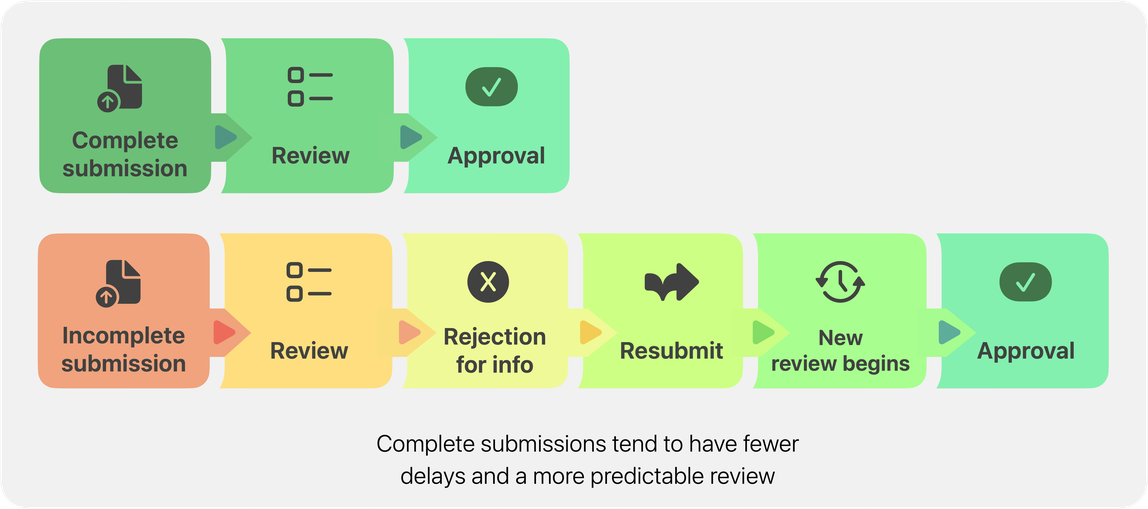
Submitting all required information and documentation up front can ensure a faster and more predictable review. Incomplete submissions will be rejected.
Provide information about the app
Tell App Review about your app in general, covering who it's for and how it works:
-
New apps: Describe your app's concept and business model.
-
Updates: Describe what's changed, and where reviewers can find significant new content or features.
-
Purpose and audience: Describe the app's purpose and target audience.
-
Devices and OS versions tested: List the device models and operating systems you tested the app on before submitting.
-
External services and platforms: List the external services, tools, or platforms the app uses to deliver its core functionality (for example, data providers, authentication services, payment processors, or AI services).
-
Required hardware: Apps with required hardware must provide a video (not a screen recording) that shows your app running on a physical Apple device as it pairs and interacts with the hardware.
-
Regional differences: Describe any regional differences in the app's features or content, or confirm that the app functions consistently across all regions.
Provide demo accounts
Add up-to-date demo account login credentials:
-
Enter a username and password that work at the time of submission. Credentials that expire or change before your review starts may result in the submission being rejected.
-
If your app has multiple account types, such as administrative and general user accounts, use the Notes field to add additional credentials for each type.
-
If your app offers auto-renewable subscriptions, provide a demo account with an expired subscription to enable review of the entire purchase flow.
-
If your app requires an authentication code in addition to or instead of login credentials, include it in the Notes field in advance. Without it, a call may be required to continue the review. Calls are typically completed within three to five business days.
Provide required documentation
Developers with apps operating in regulated fields must provide documentation demonstrating they are qualified and authorized to provide those services. If the app is available in multiple countries and regions, developers may need to provide additional documentation for each location where the app is distributed. Similarly, developers with apps containing protected content must show they have permission to include it in the app.
Provide required documentation, which can vary by app type:
-
Medical apps that make diagnostic or treatment claims: Regulatory clearance for each country or region where the app is available, such as FDA, CE, or CFDA documentation, or a supporting test report or peer-reviewed study.
-
Cryptocurrency exchange apps: A cryptocurrency exchange license for each country or region where the app is available, plus partnership documentation if you're working with a third-party exchange.
-
Financial apps, including apps that offer loans: Documentation showing your partnership with the licensed financial institution or lender providing the underlying service.
-
Apps offering gambling, lotteries, or real-money gaming: The applicable gambling or lottery license for each storefront where your app is available.
-
Apps that use another party's intellectual property: Trademark or rights documentation, such as a signed contract, or email correspondence showing you have permission.
If your app falls into one of these categories, attach everything App Review will need to complete its review in the App Review Information section before you submit.
If you're unsure what information your app's review needs, consider requesting a one-on-one appointment to discuss your app's concept before you submit.
Documentation examples by guideline
App Review Guideline |
Documentation typically requested |
|---|---|
1.4.1: Diagnosing or Treating Patients |
Regulatory clearance (FDA, CE, or CFDA documentation); a supporting test report or peer-reviewed study. |
1.4.3: Cannabis, Alcohol, and Illegal Substances |
Cannabis dispensary license. |
1.7: Reporting Criminal Activity |
Documentation confirming the developer's partnership with law enforcement or a government entity, printed on that entity's official letterhead. |
2.1: Registration Verification |
International Standard Book Number (ISBN) or GRN documentation (China). |
3.1.5: Cryptocurrencies |
Cryptocurrency exchange license; partnership documentation if you're leveraging a third-party exchange partner; legal opinion. |
3.2.1: Financial Apps |
Documentation showing your partnership with the financial institution or bank providing the underlying service. |
3.2.1 / 3.2.2: Apps Offering Loans |
Loan license; business license; partnership documentation demonstrating the formal agreement between you and a licensed lender. |
4.1 / 5.2.1 / 5.2.3: Third-party trademarks, copycat concepts, fan apps, sports and sporting events, specific marks, audio/video/music, and apps that download or stream third-party content |
Trademark or rights documentation, such as a signed contract, electronic communication (emails, messaging-service screenshots), video recordings, or licensing documents. |
5.0: Published Works for Sale in China |
Publication permit; Internet Publishing License; Internet Culture Operations Permit; Operating License of Publication; Radio and Television Program Production license, where applicable. |
5.1.1: Verifying Seller and Company |
Partnership evidence, for example with an insurance company, brokerage, or applicable government body. |
5.1.3: Health and Human Research |
Ethics Review Board or Institutional Review Board (IRB) approval; human research consent form. |
5.3.3: Lotteries and Raffles |
Gambling license; SUSEP and SECAP documents (Brazil); lottery app license (China). |
5.3.4: Gambling |
Gambling license. |
Use a demonstration mode when appropriate
If your app handles sensitive user information, or operates in a highly regulated industry, you can implement a demonstration mode instead of providing a demo account. A demonstration mode should show your app's full features and functionality using demonstration data.