

-
Explore numerical computing in Swift with MLX
Bring NumPy-style computing natively to Swift with MLX Swift. Discover how to eliminate cross-language friction in your machine learning workflows by handling image processing, tensor operations, and neural network training in a single, type-safe environment. Explore the APIs that let you leverage GPU acceleration while enjoying the compiler, tooling, and debugging experience you already know.
Chapters
- 0:00 - Introduction
- 0:57 - MLX Swift and the Apple ecosystem
- 3:04 - MLX Swift
- 4:28 - Mandelbrot
- 6:34 - Heat distribution
- 8:12 - Faster convergence with SOR
- 10:17 - Curve fitting
- 12:17 - The full MLX toolkit and ecosystem
- 13:47 - Next steps
Resources
- MLX Swift LM on GitHub
- MLX Swift Examples
- MLX Examples
- MLX Swift
- MLX LM - Python API
- MLX Explore - Python API
- MLX Framework
- MLX
Related Videos
WWDC26
WWDC25
-
Search this video…
Hi! I'm David Koski and I work on MLX Swift. Numerical computing, also called numerical analysis or scientific computing, is a set of techniques and algorithms used to solve mathematical problems. These are often problems that are impractical to solve symbolically or by hand. They need massive amounts of computation. Some applications include simulations in chemistry, biology, physics and financial systems. Other domains include audio and signal processing. Visual applications include rendering, ray tracing, and fractals. Large scale gradient descent can do arbitrary curve fitting. This is the basis of training machine learning models. Today we are going to discuss numerical computing using MLX Swift.
Apple platforms have a rich numerical-computing ecosystem. Each existing framework is great at what it's designed for. Accelerate gives you hand-tuned vector primitives on the CPU.
BNNS is the building block layer for neural networks. Metal Performance Shaders give you direct access to GPU kernels.
Swift Numerics adds a Complex type and generic numeric protocols.
So when do you use MLX Swift? If your primary goal is writing mathematical code with an eye for performance, MLX Swift is a great solution.
The code you write looks like the math you are implementing without the programming overhead of some of the lower level libraries or the detailed bookkeeping required when manipulating arrays in plain Swift.
How does it look like math? The core idea is simple. Mathematicians and numerical analysts work with vectors and matrices. Rather than performing operations on single values you are doing it for the entire matrix at once. MLX Swift uses n-dimensional arrays as the central abstraction, like NumPy and many others before it. In fact if you've used NumPy, the API will look very familiar.
Most NumPy code can be translated to MLX Swift with minimal changes.
This is incredibly expressive without being complicated. You can understand the code when you write it and read it later. Array computing and lazy evaluation are what make two things possible: automatic GPU execution and automatic differentiation.
Best of all, mlx-swift and the entire MLX ecosystem are all open source with an MIT license.
We welcome issues and PRs and have a very active community, ask questions, fix bugs, and make it better! Here's the plan. I will first introduce MLX Swift with some basic matrix-vector operations.
Then I will dive into three examples showing how MLX Swift makes it easy to translate math into code: computation of the Mandelbrot set, finding the steady state for heat distribution, and finally curve fitting.
First up, let's talk about MLX Swift.
Here we show some MLX Swift operations, using the power iteration as an example. Let's walk through it.
We import MLX and set the matrix size and iteration count, then sample a random matrix and vector from a normal distribution.
Next we build a symmetric matrix by adding B and its transpose.
Notice how close this is to the math.
.T gives the transpose, and plus does matrix addition.
Inside the loop, matmul does matrix-vector multiplication, and norm gives the L2 norm.
Again, the code reads like the math.
Here we also see a key MLX feature: lazy evaluation.
Operations on MLX array objects build a compute graph, and nothing runs until you call ee-val or read a value.
In a loop like this, we call ee-val each step so the graph stays small.
Lazy evaluation is also what powers MLX's function transformations, like grad for automatic differentiation.
Finally, we recover the eigenvalue, and reading the value forces the computation.
Like other array frameworks, MLX Swift code reads almost like the math.
And if you actually need all the eigenvalues and eigenvectors of a matrix, the MLX Swift linear algebra package has functions for that too.
Let's move on to the next example.
Next, the Mandelbrot set. It's a classic fractal, and it's also a perfect showcase for array computing where we apply a function over a large grid of points.
The definition is surprisingly simple. For every point c in the complex plane, you iterate z = z² + c. If the magnitude never exceeds 2, the point is in the set and it's colored black.
If it diverges, it's colored by how quickly it escapes.
The beauty of a fractal is that it's self-similar and infinitely detailed, you can pan and zoom forever and the patterns never repeat. Let's start with a plain Swift implementation using scalars.
You loop over every pixel, and run the Mandelbrot iterations and check for divergence. It works. It's idiomatic Swift. But you're managing a lot of bookkeeping that has nothing to do with the problem. And it runs on the CPU, one point at a time.
Let's look at MLX Swift.
Here it is in MLX Swift. Set up a grid of complex numbers, that's c. Then the loop is just two lines. z = z * z + c applied to every point at once. Count how many iterations each point stays bounded. That's it. The code is a direct translation of the math. The computation is performed over an entire grid of points as easily as it is for a single point.
By default, the GPU is used, giving us fast performance.
Plain Swift is expressive. You can write numerical computing code naturally. But you're working scalar-at-a-time, so you have to iterate over every point yourself. The bookkeeping can obscure the math.
MLX Swift is built for numerical computing, you operate on arrays rather than scalars. It looks like the math you are trying to express. It runs faster on the GPU, processing all points in parallel. How much faster depends on the exact algorithm, but 10x faster is certainly possible. All this with smaller and simpler code.
Mandelbrot was embarrassingly parallel, every point independent. The next example is different: each cell talks to its neighbors. That pattern shows up all over physics, image processing, and neural networks. MLX handles it with a single operation: convolution.
Imagine a room with walls and heat sources. We want to know the steady-state temperature everywhere inside. The simplest method to solve this is known as the Jacobi iteration.
Model the temperature as a 2D grid.
Each new iteration averages the neighboring values with a stencil like this.
You repeat this over and over and the heat spreads out until it reaches a steady state. Notice the update only looks at a small neighborhood, and it's the same recipe at every point, that's exactly what a convolution is. Let's see it in code.
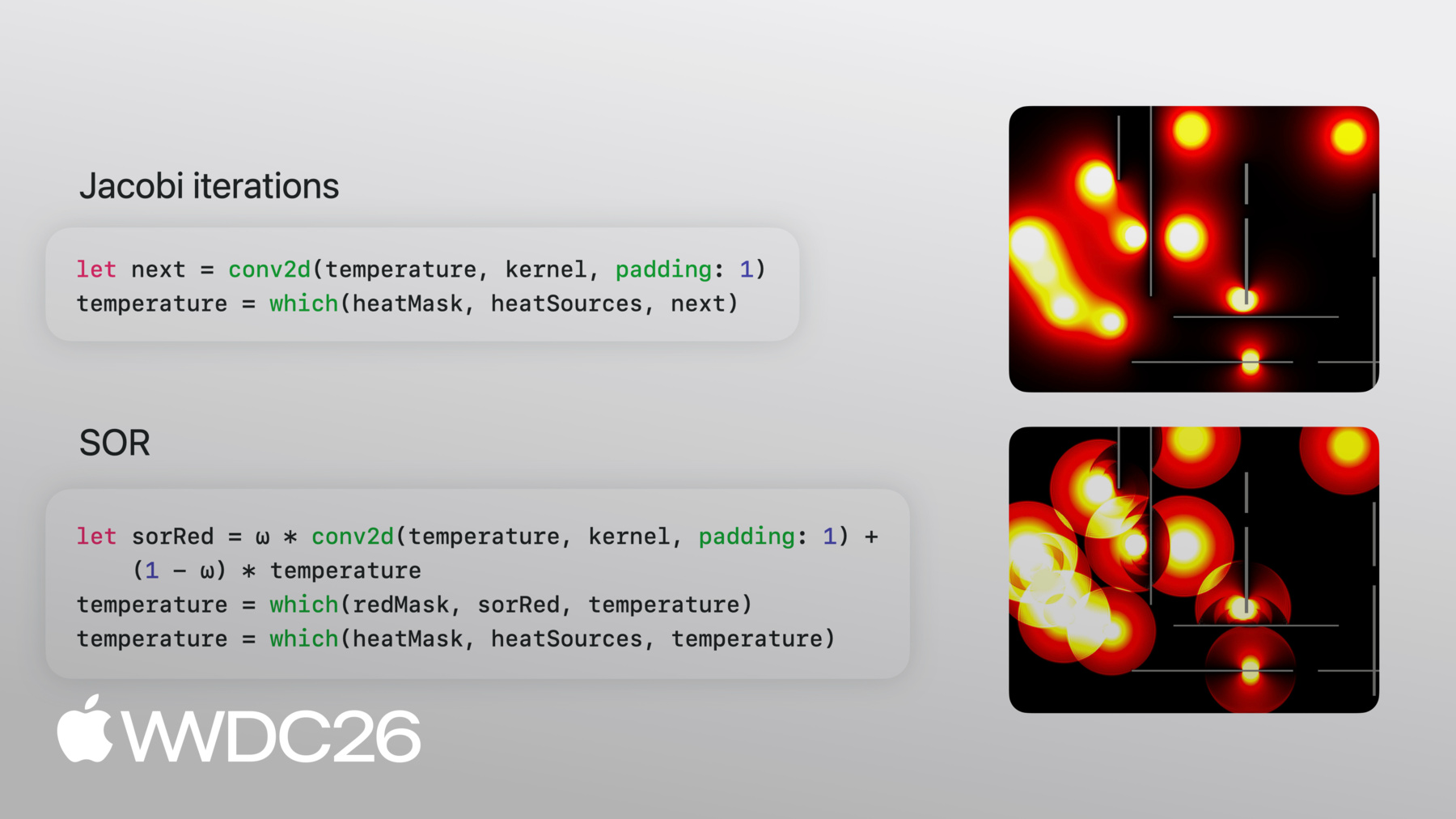
Here's the core of the solver in MLX Swift. Let me walk through it. The kernel is the stencil from the previous slide, written out literally: the four quarters on the neighbors, zeros on the center and corners. The temperature grid starts as the heat sources, a reasonable initial value. Inside the loop, two lines. The first is the physics: conv2d applies the stencil across the entire grid in one call. The second line handles the boundary conditions: which is an elementwise ternary. Wherever the mask says this is a heat source or a wall, keep the fixed value; everywhere else, take the new value from the convolution. That's it.
The math said average the four neighbors and we implemented that as a single call to conv2d.
Jacobi iteration is fast to compute but slow to converge. Heat can move one cell at a time and typically steady state requires N^2 iterations where N is the side of the grid. Much like quicksort does less work than bubble sort, there are algorithms that reach steady state with less work. One of these is called Successive Over-Relaxation, or SOR.
The equation looks similar to Jacobi iterations. In fact it uses the same convolution kernel. It uses a parameter, omega, which pushes each update further in the direction of change, overshooting slightly to get there faster.
The overshoot will recover as it iterates. The omega parameter can be computed based on the size of the array and if the optimal value is used, this will converge in N iterations. The other key to the technique is in-place updates. MLX typically produces new arrays rather than updating in place, but a red/black checkerboard pattern where alternating cells are processed can be used to compute new values, giving the same effect.
On to the code! First, we compute the optimal omega based on the size of the grid.
You can see how we use omega here, it exactly matches the equation.
We use the checkerboard masks to update alternating cells in the array.
Now the black cells run the same update, but this time their red neighbors already have fresh values, which is exactly the in-place effect we needed. Repeat this in a loop as before. Let's see the difference.
The Jacobi and SOR code are nearly identical and they closely match the math.
Let's see how these run.
You can see Jacobi on the top slowly spread while SOR on the bottom quickly fills the area.
SOR has a striking ripple pattern as it runs, that's the overshooting and correcting in real time.
By the end, both converge to the same configuration. One more thing. I had to slow SOR down by a factor of 100 just to make it visible. The power of choosing the right algorithm! The first two examples were forward computation: start with inputs, compute outputs. The last one flips that around. You have outputs, data points, and you want to find the parameters that produce them. This is where we will apply a key function transformation provided by MLX Swift: 'grad' for automatic differentiation.
Let's say you have some points and you want to find a function that approximates them.
You decide the structure of the function you want. It could be a polynomial, a sum of sines, or whatever you like.
For this example we will use a polynomial, a quadratic that will give us a parabola. You want to minimize the loss.
The mean of the squared differences between the output of your function and the actual data.
This is the same core idea behind training every ML model, just on a smaller scale.
To minimize the loss, we need the gradient with respect to the parameters and an optimization loop to update parameters. We define the function f and the loss, which is mean squared error.
Next we make theta, the coefficients we are going to fit, and transform the loss function into a function that produces the exact gradient with respect to the parameters. We didn't write any derivatives by hand. They were derived by MLX.
In the optimization loop we evaluate the gradient at the current parameters, take a small step, and call eval to flush the computation graph each iteration so it doesn't grow without bound. That's gradient descent.
Here is what that looks like. The parabola quickly gets close and overshoots the data but settles in to closer and closer approximations.
Now this example was a simple polynomial and we could have used QR from the linear algebra package to fit the curve directly.
Gradients work with arbitrarily complex functions. If you need more than just gradients, MLX has a suite of optimization algorithms like SGD, Adam, RMSprop, and more.
I've shown array computing, convolution and grad today, but MLX includes the full numericalcomputing toolkit.
Here is a sample. Linear algebra, FFTs, N-dimensional convolutions, Reductions, Scans, Indexing, Random number generation, and many more.
There's already a healthy ecosystem of packages built on MLX Swift. The core mlx-swift repo is the framework you've been seeing all session. mlx-swift-lm is where the Swift language-model implementations live. mlx-swift-examples has example programs that you can look at to get started. Examples based on this session will be posted there.
All of these are open source and are installable with a few lines with Swift Package Manager. MLX isn't only Swift. It's one framework with four front-ends: Swift, Python, C++, and C. Third parties have built even more front-ends if you have needs beyond that. They share the same concepts, the same operations, and the same lazy-evaluation model. The concepts and patterns transfer across them with minimal changes. So you can prototype in Python and ship in Swift. Python also has a broader research ecosystem around it. Projects like mlx-lm and mlx-vlm are worth a look if you want to see what's been built on the Python side. I encourage everybody to take a look at mlx-swift and mlx-swift-examples. mlx-swift has documentation and tests you can explore to see how it works. mlx-swift-examples has a variety of example applications that demonstrate LLM integration, stable diffusion, model training and fine-tuning, and of course the examples shown in this talk.
Do you have numerical computing needs? Or just want to play around with interesting simulations and visualizations? Give it a try! And if something sparks an idea I encourage everybody to participate and contribute. There are open issues that you can try fixing or make a new example program.
Thanks for watching!
-
-
3:04 - Power iteration with MLX Swift arrays
import MLX let n = 100 let steps = 10 let B = MLXRandom.normal([n, n]) var v = MLXRandom.normal([n]) // get symmetric matrix A = Bᵀ + B let A = B.T + B // Power iteration → top eigenvector of A. // v ← A v / ‖A v‖ for _ in 0 ..< steps { let Av = matmul(A, v) v = Av / norm(Av) eval(v) } // recover the eigenvalue. // λ = vᵀ A v let lambda = matmul(matmul(v.T, A), v) print(lambda) -
5:09 - Mandelbrot set in plain Swift (scalar)
// Plain Swift, scalar-at-a-time var counts = Array2D<Int>(width: w, height: h) for y in 0 ..< h { for x in 0 ..< w { let c = Complex(xMin + Float(x) * xStep, yMin + Float(y) * yStep) var z = Complex<Float>.zero var limit = maxIterations for i in 0 ..< maxIterations { z = z * z + c if z.lengthSquared > radiusSquared { limit = i break } } counts[x, y] = limit } } -
5:27 - Mandelbrot set in MLX Swift (array)
// Compute the Mandelbrot set on a grid of complex numbers import MLX let x = linspace(Float(-2.0), 0.5, count: w) let y = linspace(Float(-1.25), 1.25, count: h).reshaped(h, 1) let c = x + y.asImaginary() var z = MLXArray.zeros(like: c) var counts = MLXArray.zeros(c.shape, dtype: .int16) for _ in 0 ..< maxIterations { z = z * z + c // iterate z ← z² + c counts = counts + (abs(z) .< 2) // count bounded iterations } -
7:27 - Jacobi iteration with conv2d
// Jacobi iteration: average the four neighbors // Convolution weights let kernel = MLXArray(converting: [ 0, 0.25, 0, 0.25, 0, 0.25, 0, 0.25, 0, ]).reshaped(1, 3, 3, 1) // Initial value var temperature = heatSources // Run this in a loop until convergence let next = conv2d(temperature, kernel, padding: 1) temperature = which(heatMask, heatSources, next) -
9:17 - Successive Over-Relaxation (SOR)
// Successive Over-Relaxation: blend the previous and next state let ω: Float = 2.0 / (1.0 + sin(Float.pi / Float(max(M, N)))) let redMask = checkerboard(rows: M, cols: N, phase: 0) let blackMask = checkerboard(rows: M, cols: N, phase: 1) // Update red cells using black neighbors let sorRed = ω * conv2d(temperature, kernel, padding: 1) + (1 - ω) * temperature temperature = which(redMask, sorRed, temperature) temperature = which(heatMask, heatSources, temperature) // Update black cells using (now-updated) red neighbors let sorBlack = ω * conv2d(temperature, kernel, padding: 1) + (1 - ω) * temperature temperature = which(blackMask, sorBlack, temperature) temperature = which(heatMask, heatSources, temperature) -
11:13 - Curve fitting with automatic differentiation
// Define a loss, then optimize it with autodiff
// x, y: data points as MLXArrays
func f(_ θ: MLXArray) -> MLXArray {
    θ[0] + θ[1] * x + θ[2] * x ** 2
}

func loss(_ θ: MLXArray) -> MLXArray {
    mean((f(θ) - y) ** 2)
}

var θ = zeros([numParams])
let gradLoss = grad(loss)

for _ in 0 ..< steps {
    let g = gradLoss(θ)         // ∇L(θ)
    θ = θ - learningRate * g    // parameter update
    eval(θ)                     // force evaluation
}
-
-
- 0:00 - Introduction
What numerical computing is and its applications — from simulations in chemistry, biology, and physics to signal processing, rendering, fractals, and machine learning training via gradient descent.
- 0:57 - MLX Swift and the Apple ecosystem
Where MLX Swift fits among Apple's existing numerical computing frameworks (Accelerate, BNNS, Metal Performance Shaders, Swift Numerics) — and why to choose MLX Swift when your primary goal is writing mathematical code that looks like the math, with automatic GPU execution and automatic differentiation.
- 3:04 - MLX Swift
Core MLX Swift concepts — n-dimensional arrays as the central abstraction (similar to NumPy), lazy evaluation that builds a compute graph before executing, and a walkthrough of the power iteration algorithm showing how operations like matmul, norm, and transpose map directly to mathematical notation.
- 4:28 - Mandelbrot
Computing the Mandelbrot fractal as a showcase for array computing — comparing a scalar-at-a-time plain Swift implementation against an MLX Swift version that applies z = z² + c across the entire grid of complex numbers at once, running on the GPU with up to 10x speedup in fewer lines of code.
- 6:34 - Heat distribution
Finding steady-state temperature in a room using Jacobi iteration — modeling heat as a 2D grid, implementing the four-neighbor stencil as a single conv2d call, and applying boundary conditions with an elementwise ternary. A convolution as physics.
- 8:12 - Faster convergence with SOR
How Successive Over-Relaxation (SOR) reaches steady state in N iterations versus N² for Jacobi — using an omega parameter to overshoot updates, a red/black checkerboard pattern to simulate in-place updates, and a side-by-side comparison showing SOR completing 100x faster with the same minimal code.
- 10:17 - Curve fitting
How automatic differentiation flips forward computation — given data points and a parametric function (a quadratic), using MLX's grad to derive gradients automatically and running a gradient descent loop to fit the curve without writing a single derivative by hand.
- 12:17 - The full MLX toolkit and ecosystem
Overview of MLX's complete numerical computing toolkit — linear algebra, FFTs, n-dimensional convolutions, reductions, scans, indexing, random number generation, optimizers (SGD, Adam, RMSprop) — and the Swift ecosystem of packages including mlx-swift, mlx-swift-lm, and mlx-swift-examples.
- 13:47 - Next steps
How to get started with mlx-swift and mlx-swift-examples (LLM integration, stable diffusion, model training, and session examples), MLX's multi-language support (Swift, Python, C++, C).