-
Build real-time apps and services with gRPC and Swift
Build engaging live experiences with gRPC in your Swift app and backend. gRPC is an open-source RPC framework designed for high-performance, bidirectional streaming APIs. Explore how the gRPC Swift package provides a modern, safe runtime built with Swift concurrency. Learn how integrated tools streamline your workflow and help you deliver real-time features with ease.
Chapters
- 0:00 - Introduction
- 1:39 - Meet gRPC
- 2:13 - App overview and demo setup
- 3:30 - Defining the ListRaces RPC
- 4:30 - Setting up Xcode to generate gRPC code
- 7:50 - Managing the gRPC client lifecycle
- 9:36 - Protobuf message format and binary efficiency
- 12:33 - Implementing a bidirectional streaming RPC
- 20:11 - Deploying the service
- 23:11 - Next steps
Resources
- About gRPC
- gRPC Swift Extras
- gRPC Swift Protobuf
- gRPC Swift NIO Transport
- gRPC Swift
- Swift on Server
Related Videos
WWDC25
WWDC24
WWDC23
-
Search this video…
Hi, I'm George from the Swift Server team. In this video, I'll show you how you can build real time experiences in your apps and services with gRPC Swift. Dynamic app experiences usually depend on fetching data from a server, but working with services can be challenging. Hand crafting networking code to interact with a service can be time consuming. You start with some documentation, spend time crafting great APIs and end up with something that seems to work. But the documentation isn't always up-to-date, and maybe you made some mistakes along the way and the result can be something that doesn't always work as you expect. Fortunately, there's a better way. Many service APIs are defined separately in a specification which acts as the source of truth for the service. This allows you to generate the code required to interact with it, saving you time and eliminating errors. These benefits scale across all of the APIs that you need to interact with. A great option for HTTP based APIs is OpenAPI. It's widely used and has great support in Swift which my teammate Si talked about in the session named "Meet Swift OpenAPI Generator". We'll look at an alternative called gRPC. Then I'll show you how you can use it in your app to make simple requests and build real-time experiences using streaming RPCs. Then, we'll see how to implement a gRPC service and deploy it to the cloud. First though, let's talk about what gRPC is.
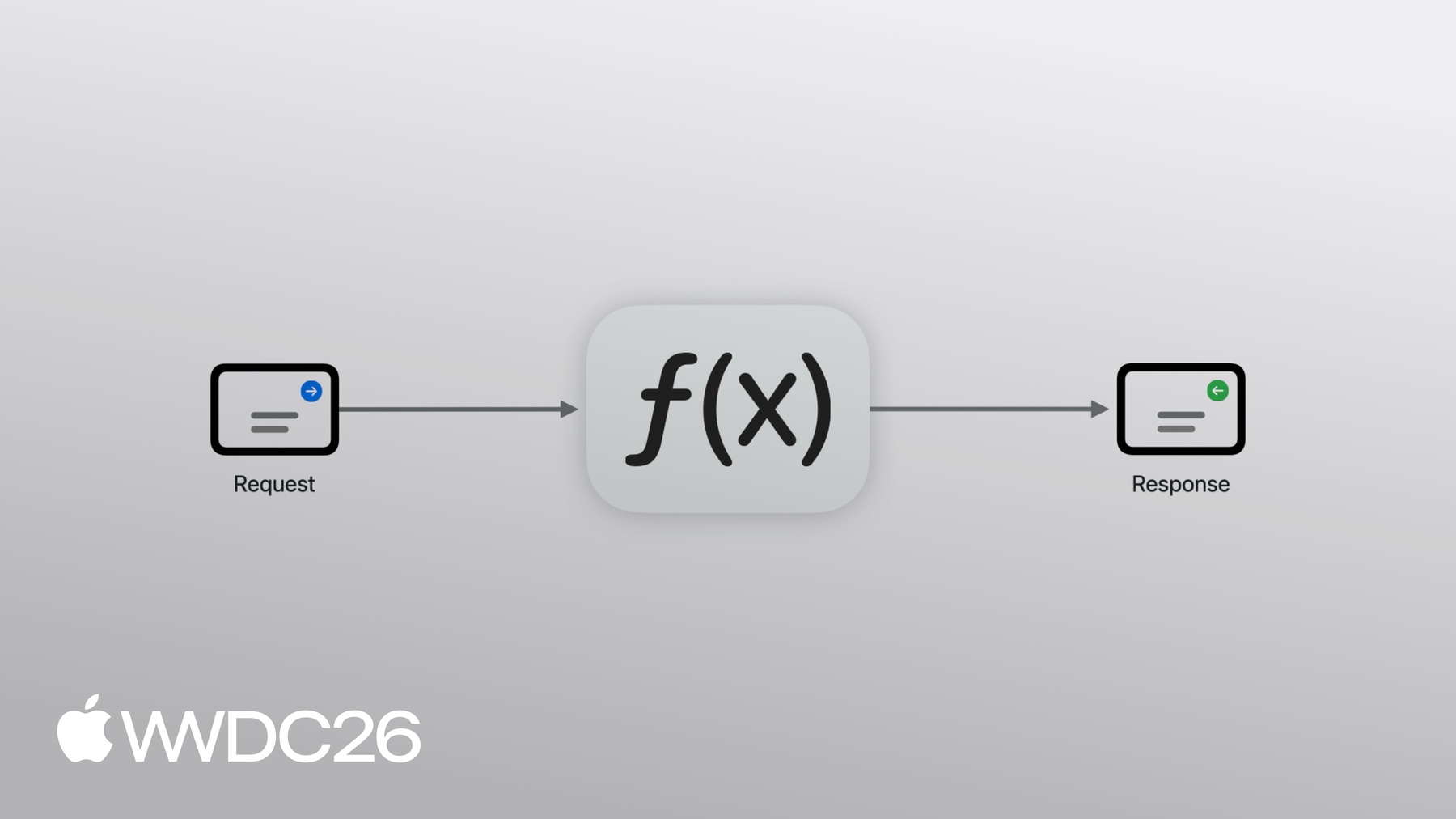
gRPC is a framework for making remote procedure calls. It's a CNCF project and widely adopted industry standard. Like with OpenAPI you work with code that's generated from a specification, allowing you to start working with services quickly. But in gRPC your APIs are defined in terms of functions with input and outputs, rather than in terms of HTTP. Let's see how this works in practice. There's a new go karting league starting nearby. They've got a system which tracks everything from the schedule to all of the live race data, but they need a way to make that information available. I've been working on integrating an iOS app with their backend via a gRPC service. I've prepared a few views in the app and populated them with some example data. I can list the upcoming races. And then tap in to each to get more information. But it would be great to use gRPC to get this content from the server instead. A function to return the race schedule might be called list races. It could be called with the number of races to request and it would return the list of races. As a remote procedure call, the request message is sent by the client to the server, which executes the function and sends back the list of races as the response. Let's put this theory into practice and see how to use gRPC Swift in my app.
I'll start by defining the service API. Then I'll add the required dependencies to my Xcode project, configure the gRPC build plugin to generate the code I need to call my service. And then, update my app to make a call to the server. The most common format for specifying gRPC services is called Protocol Buffers, or Protobuf for short. In a .proto file, I'll define the service with one RPC called ListRaces. It has a ListRacesRequest as the input and a ListRacesResponse as the output. The request message has one field called limit which is an integer representing the maximum number of races to include in the response. I've given it a default value of 100. Every field in a message is also assigned a unique field number. The response message contains a repeated Race field. Race is defined as a separate message and contains information such as its name, location, and championship as strings, the number of laps as an integer and the start time as a timestamp. The timestamp type is one of Protobuf's Well Known Types and defined elsewhere so I need to import its definition. Now that I've defined the service I can switch to Xcode to add the gRPC dependencies and configure the code generator. To get started, I need to add some dependencies to my project. I'll navigate to the Project Editor.
Then, I'll select the Package Dependencies tab and then click plus.
First, I'll add a dependency on grpc-swift-nio-transport which provides the high performance networking code built on top of the open source SwiftNIO library.
Then I'll add a dependency on grpc-swift-protobuf which provides a build plugin for generating gRPC code from my proto file.
Now that I've setup the dependencies, I can configure the target to use the build plugin. I'll select the app Target. Then, I'll select the Build Phases tab, and expand the section named Run Build Tool Plug-ins. Then I'll click the plus icon, select GRPCProtobufGenerator and click Add. The plugin scans the target directory for proto files and can be configured using a JSON config file. I'll add those to my target now.
The JSON file configures what code is generated. Since this is an app I only need messages and clients, I don't need the server code. Now I can recompile the app to generate the code. As a security measure, you'll be asked to trust the plug-in the first time you use it.
That's everything setup, I'm now ready to call my service. I'll open up the RaceScheduleView.
And import the modules I need.
The core module provides common gRPC runtime components, the HTTP module provides the networking code, and SwiftProtobuf lets us interact with our Protobuf messages. Next, I'll add a task modifier to the view in which I'll make the request. Inside the task, I'm going to use the withGRPCClient function to create a client. I'll do this inside a do catch block and just print the errors for now. gRPC Swift lets you configure the implementation used for networking. I'll use a SwiftNIO based one to connect to a server running locally on my Mac.
The client passed to the closure only knows about the server. It doesn't know anything about the service. This is where the generated code comes in: I'll create a SwiftKart client, and initialize it with the gRPC client, then I'll create the request, call the list races RPC and await the response.
Finally, I'll update the view with the new data by mapping the response from the server to the data model used by the view.
And just like that we've fetched the race schedule from our local server. Finite Loops sounds fun, and it's starting soon! Before I go any further I need to make one important change. At the moment, my app creates a new gRPC client every time the view appears. This means each view needs to establish its own connection to the server, adding unnecessary latency. Instead, my app should create a client and share it between views so that connections can be reused.
I can propagate the client via the app's environment. Clients should also be disconnected when the app enters the background to free up resources. In Xcode I'll add some code for a client manager I wrote earlier.
Then I'll open the app entry point and create an instance of the manager.
I'll make it available to child views via the environment modifier. I should also disconnect the client when the scene enters the background phase. To do that, I'll create a scene phase property and then watch it for changes.
My manager class connects lazily when asked for a client so I don't need to do anything when the scene enters the active state. Now I'll use the manager in the RaceScheduleView. I'll add it to the view, and make it available in the preview.
Finally I'll replace the withGRPCClient call with a call to the manager.
That's my app setup and talking to my service using code generated from a service API defined in Protobuf. In addition to the Service API, Protobuf provides a message interchange format. SwiftProtobuf has a code generator so that you can work directly with Swift types that represent your messages. For example I can create a race message and populate the fields with the relevant information. When gRPC sends messages between the client and server, it serializes them to a binary representation. It uses the unique field number rather than name to identify each field. As a result, the Protobuf message is roughly half the size of the equivalent JSON message. Reducing message size is great for mobile apps where minimizing data transfer helps improve the performance of your network calls. This is especially important when network conditions are poor. This efficiency is great for other environments too, like service-to-service communication. And interprocess communication like in Apple's open source Containerization framework. It uses gRPC Swift to communicate over virtual sockets between the host operating system and a Linux Virtual Machine. gRPC Swift is also a key component in cloud services like Private Cloud Compute, iCloud Keychain and Photos, and SharePlay file sharing. But our use doesn't just power external facing services, gRPC runs deep into our internal infrastructure, such as in our OS build and release systems. One of gRPC's standout features is its first class support for streaming Many RPCs, like list races, simply send a single request message to the server which replies with a single response message. This is called a unary RPC. But RPCs can stream request and response messages, meaning there are three other types of RPC to explore. A client streaming RPC is when the client sends any number of messages to the server which replies with a single response message. Imagine each go kart streaming its telemetry data to the server. In server streaming RPCs the client sends a single request message to the server which replies with any number of response messages. Think about real-time updates, like a live text commentary feed. The final type is bidirectional streaming where the client and server can send each other any number of messages. I've got a great idea for how I can use this in my app to provide live race updates. The request messages will tell the server what type of events the client has subscribed to, and the response messages will contain the relevant events. The client can send more messages to the server when they change what events they're interested in receiving.
My app has been making requests to a server running on my Mac which is also written in Swift. Let's take a look. Setting up the server is straightforward. I create a server object initialized with a transport, and the services it should offer. To start the server, I just call serve. The service is just a type that implements a protocol generated by the build plugin. You can see the list races RPC I implemented earlier: it's an async function which takes a request and returns a response. Implementing it is just a matter of querying the database for races, populating the message and then returning it. To incorporate the streaming RPC, I'll update the service definition, then I'll switch to the server and regenerate the code so I can implement the new RPC. And once that's done, I'll update the app to call it. I'll start by adding a FollowRace RPC to the service definition. Because the RPC streams request and response messages, I need to add the stream keyword before the input and output. Then I need to define the messages. The request message includes the name of the race to follow and a list of event types to subscribe to which is represented as an enum. The response type has a oneof field which is just like a Swift enum with associated values. The message can either hold the locations of each kart or the current race standings, which are defined as separate messages. Now that the service definition has been updated, I'll switch to the server in Xcode so I can work on implementing the new RPC. I'll build the project to regenerate the code.
I have a build error now because the protocol has a new requirement that I haven't implemented yet, so I'll fill out a stub.
This looks a bit different to the list races RPC because of the streaming. The request parameter is an async sequence of request messages and the response parameter is an object for writing response messages to the client. I know that I need to handle two streams of data simultaneously so I'll need a task group.
I need to wait for the first request message so that I know the name of the race to track and which events the caller is interested in. I'll create an async iterator and await the first message. I'll store the events in a set protected by a mutex because two different tasks will need to access it concurrently. Then I'll add a task to the task group which calls the live race tracker with the name of the race to follow.
This gives me an async sequence of events which I can then filter to only include the ones the client is currently interested in.
I'll iterate the filtered events and create an empty response message.
Then, I'll switch over the event and populate the message. First, I'll map the array of kart locations from the tracker to the data type used by the RPC. Then, I'll do the same for the standings.
Now I'll write the message to the client.
There are a few things left to do: the first is to continue consuming the request messages as the caller might change what events they're interested in. We'll use the end of the request stream as a signal that the client no longer wants any more events, so we can cancel the tasks running in the task group to stop sending back messages. Finally I'll restart my server so that the client can call the new RPC.
That's the RPC implemented in the service, now I can update the app. I'll open the Xcode project for the app, and update the proto file to include the new RPC and messages.
I'll build the project to regenerate the gRPC code.
Then I'll navigate to the RaceInfoView. and add a NavigationLink to a LiveStreamView that I created earlier. Then I'll open up the live stream view.
It displays a map that will draw annotations representing the positions of each kart in the race. There's also a toolbar button which opens a sheet to display a live leaderboard. The showLeaderboard property tracks whether this is displayed or not. The view already has properties to store the various bits of state I'm interested in, I just need to call the RPC and wire up the data received from the server. First, I'll add the imports I used earlier. Then I'll inject the client via the environment.
Like before I'll create a task, and call manager.withClient.
Then I'll create a kart client and call the FollowRace RPC.
Its structure is different to the unary list races RPC. It has two closures, one for writing request messages and another for handling response messages. I need to send a request message every time the value of showLeaderboard changes. I'll use an AsyncStream to track it over time and store its continuation as a property.
When showLeaderboard changes, I'll yield the new value to the continuation. I'll create the AsyncStream and its continuation in the task.
I'll need to yield the current value of showLeaderboard to the stream as the initial value. In the first closure of the RPC I can iterate the stream, and send a message to the server for each value. If the leaderboard is being shown I'll add the standings event.
And then I'll write the message to the server.
In the response closure, I'll iterate the messages and update the view state for each event. I'll use a helper method for handling the events.
I'll switch over the event and map each to the data type used by the view.
I'll start with the kart locations. And then I'll do the same for the standings Finally, I'll iterate the response messages and call the helper for each event.
Let's check it out.
It looks like a race is about to start at Apple Park. They're heading down towards the Rainbow Arches and now it looks like they're turning right towards the Duck Pond. Monty's in the lead, followed closely by Pepper and Bo. That's great, but I still haven't achieved my goal of making the information available to spectators because the service is running locally. Let's deploy it to the cloud so that it's available to everyone using the app. I'm using Google Cloud Platform to host my service, but you could use another platform like AWS or Fly.io. The approach will be similar but the exact steps will be different. Most servers run Linux and that's what I'll deploy to today. I don't need to make any code changes but I do need to package up the server executable into a container image with its runtime dependencies. Then I'll publish the image to my cloud provider's image registry. After that I'll create a deployment. Finally I'll update the app to target the deployed service. I'll start by creating a Containerfile which describes the steps required to build the container image. I'll use swift:latest as the base image. Next, I'll set the working directory, and copy over the package manifest and source files. Then I'll build the server in release mode and copy it into a known location. At this point, I have the server executable in my image, but it also contains the whole Swift toolchain. I don't need all of that to run my server and it makes the image much larger than it needs to be.
I'll use a multi-stage build and copy the binary into a swift:slim runtime image. Finally, I expose a port and set the entry point to be the server. That's the Containerfile written, at this point I would build and publish the image to a container registry but that will take a few minutes, so I'll use one I published earlier. In the terminal I can use the gcloud run deploy command.
I'll provide the name of the deployment, the image name and the region. Then I need to specify that my service uses http2 and allows unauthenticated requests. When the deployment finishes, it prints out the URL for the service which I'll need when I update the client, so I'll copy it now.
I'll switch back to the app and open the ClientManager. I'll update the connect target to the DNS name of the service from the deploy command. Then I'll enable TLS by changing the transport security option from plaintext to TLS.
Let's test it out.
It looks like we just made the start of the Finite Loops race.
Oh what a disastrous start for Pepper, as Monty takes first position, followed closely by Mycroft and Kiko.
The drivers are turning into the Infinite Loop campus. Pepper's gained back a few positions. It looks like we're in for a great race here.
I've shown you how to use gRPC Swift to build great live experiences in your apps, and how it can simplify app-to-server communication from defining a service, generating code, all the way through to implementing and deploying a service to the cloud. And that's just the start. gRPC Swift has plenty of built in features to help you take your application from prototype to production Whether that's integration with other Swift packages like Swift OTel or Swift service lifecycle. Or advanced connection management features like custom transports and name resolvers, and client side load balancing. You're now ready to use gRPC in your app: why not prototype part of the app to server interactions and see how simple gRPC Swift makes the workflow. Or you could try out one of the tutorials and examples in the project's repository available on GitHub. Because the project is open source, you can also contribute, whether that's asking questions, improving documentation, or proposing and implementing new features. Thank you for watching and see you on track!
-
-
3:38 - ListRaces RPC definition
edition = "2024"; import "google/protobuf/timestamp.proto"; service SwiftKartService { rpc ListRaces(ListRacesRequest) returns (ListRacesResponse); } message ListRacesRequest { int32 limit = 1 [default = 100]; } message ListRacesResponse { repeated Race races = 1; } message Race { string name = 1; string location = 2; google.protobuf.Timestamp start_time = 3; int32 laps = 4; string championship = 5; } -
5:55 - grpc-swift-proto-generator-config.json
{ "generate": { "clients": true, "servers": false, "messages": true } } -
6:24 - Add gRPC imports
import GRPCCore import GRPCNIOTransportHTTP2 import SwiftProtobuf -
6:38 - Create a gRPC client connected to a local server
.task { do { try await withGRPCClient( transport: .http2NIOTS( address: .ipv4(host: "127.0.0.1", port: 8080), transportSecurity: .tls ) ) { client in <#code#> } } catch { print("gRPC error: \(error)") } } -
7:14 - Call the ListRaces RPC and update the view
.task { do { try await withGRPCClient( transport: .http2NIOTS( address: .ipv4(host: "127.0.0.1", port: 8080), transportSecurity: .tls ) ) { client in let kart = SwiftKartService.Client(wrapping: client) let request = ListRacesRequest() let response = try await kart.listRaces(request) self.races = response.races.map { race in RaceInfo( name: race.name, location: race.location, startTime: race.startTime.date, championship: race.championship, laps: Int(race.laps), drivers: race.drivers ) } } } catch { print("gRPC error: \(error)") } } -
8:30 - ClientManager.swift
import GRPCCore import GRPCNIOTransportHTTP2 import Synchronization import SwiftUI @Observable final class ClientManager: Sendable { fileprivate let state = Mutex(State.disconnected) static func makeTransport() throws -> HTTP2ClientTransport.TransportServices { try .http2NIOTS( target: .ipv4(address: "127.0.0.1", port: 8080), transportSecurity: .plaintext ) } func withClient( body: (_ client: GRPCClient<HTTP2ClientTransport.TransportServices>) async throws -> Void ) async throws { let client = try connectIfNecessary() try await body(client) } private func connectIfNecessary() throws -> GRPCClient<HTTP2ClientTransport.TransportServices> { try self.state.withLock { state in try state.connectIfNecessary() } } func disconnect() { let client = self.state.withLock { state in state.disconnect() } client?.beginGracefulShutdown() } } extension ClientManager { enum State { case connected(GRPCClient<HTTP2ClientTransport.TransportServices>, Task<Void, any Error>) case disconnected } } extension ClientManager.State { mutating func connectIfNecessary() throws -> GRPCClient<HTTP2ClientTransport.TransportServices> { switch self { case .connected(let client, _): return client case .disconnected: let client = try GRPCClient(transport: ClientManager.makeTransport()) let task = Task { try await client.runConnections() } self = .connected(client, task) return client } } mutating func disconnect() -> GRPCClient<HTTP2ClientTransport.TransportServices>? { switch self { case .connected(let client, _): self = .disconnected return client case .disconnected: return nil } } } -
8:39 - Propagate ClientManager to child views
import SwiftUI @main struct SwiftKartApp: App { let manager = ClientManager() var body: some Scene { WindowGroup { RaceScheduleView() .environment(manager) } } } -
8:52 - Disconnect ClientManager when the scene enters the background phase
import SwiftUI @main struct SwiftKartApp: App { let manager = ClientManager() @Environment(\.scenePhase) private var scenePhase var body: some Scene { WindowGroup { RaceScheduleView() .environment(manager) } .onChange(of: scenePhase) { _, newPhase in switch newPhase { case .background : manager.disconnect() case .inactive, .active: break @unknown default: break } } } } -
9:12 - Inject ClientManager into the view via @Environment
@Environment(ClientManager.self) var manager -
9:21 - Replace withGRPCClient with manager.withClient
.task { do { try await manager.withClient { client in let kart = SwiftKartService.Client(wrapping: client) let request = ListRacesRequest() let response = try await kart.listRaces(request) self.races = response.races.map { race in RaceInfo( name: race.name, location: race.location, startTime: race.startTime.date, championship: race.championship, laps: Int(race.laps), drivers: race.drivers ) } } } catch { print("gRPC error: \(error)") } } -
9:41 - Using SwiftProtobuf
var race = Race() race.name = "Duck Pond Dash" race.location = "Apple Park, Cupertino" race.startTime = .init(roundingTimeIntervalSince1970: 1_781_198_600) race.laps = 6 race.championship = "Corporate Cup" race.drivers = ["Monty", "Pepper", "Mycroft", "Pancakes", "Duke", "Kiko", "Sissi", "Bo"] try race.serializedBytes() -
12:32 - Server
let server = GRPCServer( transport: .http2NIOPosix( address: .ipv4(host: "127.0.0.1", port: 8080), transportSecurity: .plaintext ), services: [Service()] ) try await server.serve() -
12:45 - Service
struct Service: SwiftKartService.SimpleServiceProtocol { private let database = RaceDB() func listRaces( request: ListRacesRequest, context: ServerContext ) async throws -> ListRacesResponse { var response = ListRacesResponse() response.races = await database.listRaces(atMost: request.limit) return response } } -
13:20 - swift_kart_service.proto
edition = "2024"; import "google/protobuf/duration.proto"; import "google/protobuf/timestamp.proto"; service SwiftKartService { rpc ListRaces(ListRacesRequest) returns (ListRacesResponse); rpc FollowRace(stream FollowRaceRequest) returns (stream FollowRaceResponse); } message ListRacesRequest { int32 limit = 1 [default = 100]; } message ListRacesResponse { repeated Race races = 1; } message Race { string name = 1; string location = 2; google.protobuf.Timestamp start_time = 3; int32 laps = 4; string championship = 5; repeated string drivers = 6; } message FollowRaceRequest { string race_name = 1; repeated RaceEventType event_types = 2; } enum RaceEventType { RACE_EVENT_TYPE_UNSPECIFIED = 0; RACE_EVENT_TYPE_KART_LOCATIONS = 1; RACE_EVENT_TYPE_STANDINGS = 2; } message FollowRaceResponse { oneof event { KartLocations locations = 1; Standings standings = 2; } } message KartLocations { message Kart { int32 number = 1; double latitude = 2; double longitude = 3; google.protobuf.Timestamp recorded_at = 4; } repeated Kart karts = 1; } message Standings { message Entry { int32 kart_number = 1; google.protobuf.Duration gap_to_leader = 2; int32 position = 3; int32 lap = 4; } repeated Entry entries = 1; } -
14:16 - FollowRace stub
func followRace( request: RPCAsyncSequence<FollowRaceRequest, any Error>, response: RPCWriter<FollowRaceResponse>, context: ServerContext ) async throws { throw RPCError(code: .unimplemented, message: "FollowRace is unimplemented") } -
14:38 - Implement the FollowRace RPC
func followRace( request: RPCAsyncSequence<FollowRaceRequest, any Error>, response: RPCWriter<FollowRaceResponse>, context: ServerContext ) async throws { try await withThrowingTaskGroup { group in var iterator = request.makeAsyncIterator() guard let first = try await iterator.next() else { return } let eventTypes = Mutex(Set(first.eventTypes)) group.addTask { let events = tracker.events(forRace: first.raceName).filter { event in eventTypes.withLock { $0.contains(event.type) } } for await event in events { var message = FollowRaceResponse() switch event { case .locations(let locations): message.locations.karts = locations.map { location in var kart = KartLocations.Kart() kart.number = Int32(location.number) kart.latitude = location.latitude kart.longitude = location.longitude return kart } case .standings(let standings): message.standings.entries = standings.map { standing in var entry = Standings.Entry() entry.gapToLeader = .init(rounding: standing.delta, rule: .towardZero) entry.kartNumber = Int32(standing.kartNumber) entry.lap = Int32(standing.lap) entry.position = Int32(standing.position) return entry } } try await response.write(message) } } while let next = try await iterator.next() { eventTypes.withLock { $0 = Set(next.eventTypes) } } group.cancelAll() } } -
16:39 - swift_kart_service.proto
edition = "2024"; import "google/protobuf/duration.proto"; import "google/protobuf/timestamp.proto"; service SwiftKartService { rpc ListRaces(ListRacesRequest) returns (ListRacesResponse); rpc FollowRace(stream FollowRaceRequest) returns (stream FollowRaceResponse); } message ListRacesRequest { int32 limit = 1 [default = 100]; } message ListRacesResponse { repeated Race races = 1; } message Race { string name = 1; string location = 2; google.protobuf.Timestamp start_time = 3; int32 laps = 4; string championship = 5; repeated string drivers = 6; } message FollowRaceRequest { string race_name = 1; repeated RaceEventType event_types = 2; } enum RaceEventType { RACE_EVENT_TYPE_UNSPECIFIED = 0; RACE_EVENT_TYPE_KART_LOCATIONS = 1; RACE_EVENT_TYPE_STANDINGS = 2; } message FollowRaceResponse { oneof event { KartLocations locations = 1; Standings standings = 2; } } message KartLocations { message Kart { int32 number = 1; double latitude = 2; double longitude = 3; google.protobuf.Timestamp recorded_at = 4; } repeated Kart karts = 1; } message Standings { message Entry { int32 kart_number = 1; google.protobuf.Duration gap_to_leader = 2; int32 position = 3; int32 lap = 4; } repeated Entry entries = 1; } -
16:40 - swift_kart_service.proto
edition = "2024"; import "google/protobuf/timestamp.proto"; service SwiftKartService { rpc ListRaces(ListRacesRequest) returns (ListRacesResponse); } message ListRacesRequest { int32 limit = 1 [default = 100]; } message ListRacesResponse { repeated Race races = 1; } message Race { string name = 1; string location = 2; google.protobuf.Timestamp start_time = 3; int32 laps = 4; string championship = 5; repeated string drivers = 6; } -
16:56 - Navigation link to LiveStreamView
NavigationLink(destination: LiveStreamView(race: race)) { Text("Live stream") } -
17:32 - Call the FollowRace RPC in the LiveStreamView
import SwiftUI import GRPCCore import GRPCNIOTransportHTTP2 import SwiftProtobuf struct LiveStreamView: View { private let race: RaceInfo @Environment(ClientManager.self) var manager @State private var tracking: KartTrackingViewModel @State private var standings: [StandingsEntry] = [] @State private var showLeaderboard = false @State private var continuation: AsyncStream<Bool>.Continuation? init(race: RaceInfo) { self.race = race self.tracking = KartTrackingViewModel(race: race) } var body: some View { VStack { KartTrackingMapView(viewModel: tracking) .ignoresSafeArea() .onAppear { tracking.start() } .onDisappear { tracking.stop() } } .onChange(of: showLeaderboard) { _, newValue in continuation?.yield(newValue) } .sheet(isPresented: $showLeaderboard) { LeaderboardView(race: race, standings: standings) .presentationDetents([.fraction(0.3), .medium, .large]) .presentationBackgroundInteraction(.enabled) } .toolbar { Toggle(isOn: $showLeaderboard) { Label("Leaderboard", systemImage: "list.number") } } .toolbarBackgroundVisibility(.visible, for: .navigationBar) .task { do { let (stream, continuation) = AsyncStream.makeStream(of: Bool.self) self.continuation = continuation continuation.yield(showLeaderboard) try await manager.withClient { client in let kart = SwiftKartService.Client(wrapping: client) try await kart.followRace { requestStream in for await showLeaderboard in stream { var message = FollowRaceRequest() message.raceName = race.name message.eventTypes = [.kartLocations] if showLeaderboard { message.eventTypes.append(.standings) } try await requestStream.write(message) } } onResponse: { responseStream in for try await message in responseStream.messages { if let event = message.event { await handleEvent(event) } } } } } catch { print("gRPC error: \(error)") } } } @MainActor private func handleEvent(_ event: FollowRaceResponse.OneOf_Event) { switch event { case .locations(let locations): self.tracking.updateKartCoordinates( locations.karts.map { TrackedKart(number: $0.number, latitude: $0.latitude, longitude: $0.longitude) } ) case .standings(let standings): self.standings = standings.entries.map { StandingsEntry( kartNumber: $0.kartNumber, secondsToLeader: $0.gapToLeader.timeInterval, position: $0.position, lap: $0.lap ) } } } } #Preview { NavigationStack { LiveStreamView(race: .example4) .environment(ClientManager()) } } -
20:55 - Containerfile
FROM swift:latest AS builder # Copy sources into /app WORKDIR /app COPY Package.swift Package.resolved . COPY Sources/ Sources/ # Build the server RUN swift build -c release --product server RUN cp "$(swift build -c release --show-bin-path)/server" /usr/bin/server # Copy the binary from the builder into a smaller runtime image. FROM swift:slim COPY --from=builder /usr/bin/server /usr/bin/server EXPOSE 8080 ENTRYPOINT ["/usr/bin/server"] -
21:56 - Deploy service
gcloud run deploy wwdc-demo-server \ --image us-central1-docker.pkg.dev/wwdc26/wwdc-demo-server/wwdc-demo-server:latest \ --region us-central1 \ --use-http2 \ --allow-unauthenticated -
22:22 - Target deployed service
static func makeTransport() throws -> HTTP2ClientTransport.TransportServices {
    try .http2NIOTS(
        target: .dns(host: "wwdc-demo-server-863666503339.us-central1.run.app"),
        transportSecurity: .tls
    )
}
-
-
- 0:00 - Introduction
Why hand-crafting networking code is error-prone, and how generating code from a service specification saves time and eliminates mistakes — setting up gRPC Swift as the approach for real-time experiences.
- 1:39 - Meet gRPC
gRPC is explained as a CNCF-standard remote procedure call framework that uses Protocol Buffers to define APIs as typed functions rather than HTTP endpoints.
- 2:13 - App overview and demo setup
A go-karting iOS app demo is introduced, showing how gRPC will replace static mock data with live server-fetched content.
- 3:30 - Defining the ListRaces RPC
The ListRaces RPC and its request/response messages are defined in a .proto file, covering fields, field numbers, types, and Protobuf Well Known Types.
- 4:30 - Setting up Xcode to generate gRPC code
The grpc-swift-nio-transport and grpc-swift-protobuf packages are added to the Xcode project, and the GRPCProtobufGenerator build plugin is configured to auto-generate Swift code from the proto file.
- 7:50 - Managing the gRPC client lifecycle
A shared ClientManager is introduced to reuse connections across views and disconnect the client when the app enters the background, reducing unnecessary latency.
- 9:36 - Protobuf message format and binary efficiency
The Protobuf binary serialization format is explained — using field numbers instead of names makes messages roughly half the size of equivalent JSON, benefiting mobile apps and service-to-service communication.
- 12:33 - Implementing a bidirectional streaming RPC
The FollowRace bidirectional streaming RPC is defined, implemented on the Swift server using async sequences and task groups, and wired up in the iOS app to stream live kart positions and standings.
- 20:11 - Deploying the service
The Swift server is containerised and deployed, then the app is updated to connect over TLS to the live production service.
- 23:11 - Next steps
Recap of the full gRPC workflow, with pointers to prototype your own integrations, explore the open-source GitHub repository, and contribute to the project.