

-
코딩 실습: SwiftUI에서 강력한 드래그 앤 드롭 빌드하기
SwiftUI의 최신 드래그 앤 드롭 기능을 살펴보기 위한 Solitaire 게임 빌드 실습을 함께 해 보세요. 새로운 리오더 API를 사용하여 사용자들이 콘텐츠를 배열하고, 드래그 컨테이너를 구현하여 여러 항목을 한 번에 이동하며, 앱 규칙에 맞게 드래그 앤 드롭 수명 주기를 맞춤 설정할 수 있도록 하는 방법을 안내합니다. 이 세션을 최대한 활용하려면 WWDC22의 ‘Transferable 소개'를 시청하세요.
챕터
리소스
관련 비디오
WWDC22
-
비디오 검색…
안녕하세요, 저는 UI Frameworks 팀의 엔지니어 Jack입니다. 이 영상에서는 새로운 드래그 앤 드롭 API들을 소개해 드리겠습니다 2027 릴리스에서 사용 가능한 것들입니다.
iOS 16부터 SwiftUI는 드래그 앤 드롭을 지원해 왔습니다 draggable 및 dropDestination modifier를 통해서요. draggable modifier를 사용하면 사진이나 텍스트와 같은 콘텐츠를 드래그 제스처를 통해 시스템 전체에서 이동할 수 있습니다. 데이터를 Transferable 프로토콜에 적용하면 시스템 전체에서 드래그할 수 있는 전송 표현을 제공하여 다른 앱에서도 수신할 수 있게 됩니다. 예를 들어, 카드 타입을 Transferable에 적용하면 인스턴스를 draggable modifier에 전달할 수 있습니다. dropDestination modifier는 앱과 뷰가 다양한 콘텐츠를 받아들일 수 있게 해줍니다. 뷰에서 처리할 수 있는 데이터를 결정하려면 수신할 Transferable 타입을 지정하면 됩니다. 예를 들어, 뷰에서 카드 인스턴스를 받고 싶다면 dropDestination modifier에 카드 타입을 전달하면 됩니다. 콘텐츠를 Transferable로 만드는 방법에 대한 자세한 내용은 WWDC 2022의 "Meet Transferable" 영상을 시청하길 권장합니다. SwiftUI는 드래그 앤 드롭 기능을 세 가지 주요 방법으로 확장했습니다. 새로운 순서 변경 API가 있고,
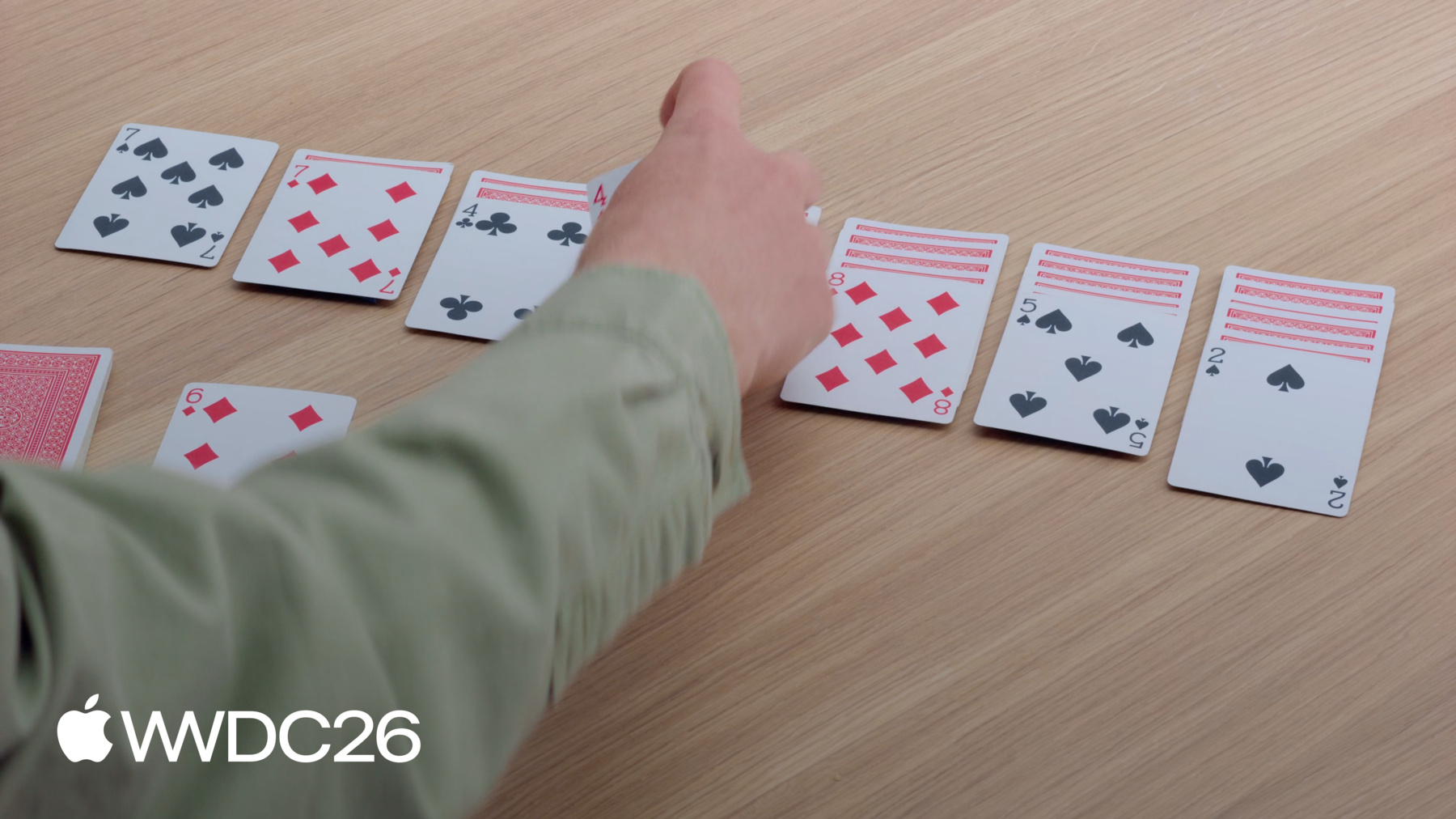
드래그 앤 드롭을 사용하여 콘텐츠를 재배열할 수 있게 해줍니다. 여러 항목을 동시에 드래그할 수 있고 Drag Container API를 사용하면 됩니다. 그리고 이제 데이터 전송 방식을 구성할 수 있습니다 드래그와 dropDestination 모두에서요. 솔리테어 게임의 드래그 앤 드롭 인터랙션을 구현해 보겠습니다. 게임은 제가 카드를 배열한 방식과 비슷하게 보일 것입니다. 카드를 파일 사이에서 이동할 수 있고,
남은 카드 덱에서 카드를 꺼낼 수 있습니다.
솔리테어를 잘 모르셔도 제가 사용할 API를 이해하는 데 문제없습니다. 따라 해보고 싶다면 샘플 프로젝트를 다운로드할 수 있습니다. 시작에 필요한 뷰와 게임 로직이 포함되어 있습니다. 새로운 reorderable API를 앱에 적용하는 것부터 시작하겠습니다. 솔리테어 게임의 카드들처럼, 앱의 콘텐츠도 어떤 순서로 존재할 가능성이 높습니다. 하지만 사람들은 그 순서를 변경하여 콘텐츠를 구성하고 싶을 수 있습니다 자신에게 가장 적합한 방식으로요. 솔리테어 게임의 카드를 재정렬 가능하게 만들면, 개별적으로 드래그할 수 있게 됩니다. 뷰를 드래그하면, 뷰 계층에서 위치가 들어올려지고 빈 플레이스홀더가 그 자리를 차지합니다. 그런 다음, 앱 전체에서 카드를 드래그할 수 있습니다. 카드를 다른 카드 위로 이동하면, 드래그 중인 카드를 놓을 공간을 만들어 줍니다. 플레이스홀더가 업데이트되어 놓을 때 드래그된 카드가 어디로 갈지 표시됩니다. 카드를 놓으면 새 위치로 이동됩니다. 이 기능을 솔리테어 게임에 추가하겠습니다. 먼저 게임 규칙 없이 재정렬을 구현해 보겠습니다. 그런 다음, 모든 것이 작동하면, 규칙을 포함하도록 구현을 다듬겠습니다. 이 앱의 Xcode 프로젝트를 열었습니다. 내용은 두 가지 주요 폴더로 나뉩니다: Game과 Views. Game 폴더에는 SwiftData 모델과 업데이트 코드가 있습니다. 대부분의 시간을 SwiftUI가 있는 Views 폴더에서 보낼 예정입니다. 플레이 영역의 레이아웃과 뷰를 포함하는 GameView를 열겠습니다. 하지만 앱에 재정렬을 추가하기 전에 Preview에서 테스트해 보겠습니다. 이 파일 하단에, 녹색 배경에 네 개의 카드를 보여주는 Preview가 있습니다. 재정렬을 활성화하려면, 카드를 생성하는 ForEach에 reorderable modifier를 추가합니다.
그런 다음, HStack에 reorderContainer modifier를 추가합니다.
컨테이너의 항목 타입이 CardValue임을 지정하면, ForEach 뷰에서 사용된 타입과 일치합니다. 클로저에서 작업 완료 시 차이가 제공되고, 카드 배열을 업데이트하여 처리합니다.
이제 Preview에서 카드를 재정렬할 수 있습니다. 왼쪽의 에이스 오브 클럽을 드래그해서 끝에 놓을 수 있습니다. 솔리테어에서 목표는 카드를 파일 사이에서 이동시켜 정리하는 것입니다. 그래서 앱에서 모든 파일을 같은 reorderContainer에 포함시키고 싶습니다.
reorderContainer modifier를 추가하면 됩니다 파일을 포함하는 HStack에요.
컨테이너의 항목 타입에 동일한 CardValue 타입을 제공합니다. 파일이 여러 개이므로, 각각을 고유하게 참조하는 방법이 필요합니다. Card.Group 타입을 사용하여 각 파일을 식별하고, 클로저에서 여러 파일에 걸친 차이를 처리합니다.
마지막으로, PileView로 이동하여 reorderable modifier를 추가해야 합니다. 같은 컨테이너에 여러 reorderable modifier가 있으므로, 각각에 고유한 식별자를 제공해야 합니다. 이제 다이아몬드 4를 드래그하여 스페이드 5가 있는 파일에 놓을 수 있습니다.
좋습니다. 하지만 지금 당장 하나 더 개선하고 싶은 것이 있습니다. 솔리테어에서는 뒤집힌 카드를 재정렬할 수 없습니다. 하지만 현재는 파일에서 하나를 들어올릴 수 있습니다. PileView의 전체 카드 배열을 재정렬 가능하게 만들었기 때문입니다. 고급 드래그 앤 드롭 API를 사용하여 이를 제어할 수도 있지만, 훨씬 더 쉬운 방법이 있습니다.
reorderable modifier 없이 두 번째 ForEach 뷰를 추가하고 두 뷰 사이에서 카드 배열을 분할할 수 있습니다.
첫 번째 ForEach 뷰에는 뒤집힌 카드가 모두 포함됩니다.
두 번째 ForEach 뷰는 reorderable modifier와 함께 앞면이 보이는 카드를 모두 포함합니다. 이 변경으로, 앞면이 보이는 카드는 여전히 재정렬할 수 있지만,
뒤집힌 카드를 드래그하면 아무 일도 일어나지 않습니다.
이제 솔리테어의 기본 인터랙션이 작동합니다. reorderable modifier 덕분에, 개별 카드를 드래그하여 순서를 변경할 수 있습니다. reorderContainer modifier는 모든 파일을 포함하도록 재정렬 범위를 지정할 수 있게 해줬습니다. 그리고 뒤집힌 카드를 별도의 ForEach로 이동하여, 재정렬되지 않도록 유지할 수 있었습니다. 이 API들은 드래그 앤 드롭을 지원하는 모든 Apple 플랫폼에서 새롭게 사용 가능합니다.
하지만 제 솔리테어 게임에는 아직 빠진 것이 있습니다 하지만 제 솔리테어 게임에는 아직 빠진 것이 있습니다 게임플레이의 핵심 부분이죠, 한 번에 여러 카드를 이동할 수 있는 기능입니다. 솔리테어에서 파일 중간의 카드를 드래그하면, 그 위에 쌓인 카드들도 함께 가져옵니다. 하지만 앱에서 인터랙션 모델은 이처럼 단순하지 않을 수 있습니다. 이를 처리하는 한 가지 방법은 드래그 가능한 항목에 선택 기능을 추가하는 것입니다. 이 예시에서는 간단한 탭-선택 인터랙션 모델을 사용하겠습니다. 카드를 탭할 때마다 선택에 추가됩니다.
선택된 카드 중 하나에서 드래그 제스처를 수행하면, 세 카드가 모두 함께 들어올려집니다.
솔리테어 게임에 여러 카드를 동시에 드래그하는 기능을 추가하겠습니다. GameView로 다시 열겠습니다, reorderContainer modifier를 추가한 곳이죠.
Reorder 컨테이너는 암묵적으로 자체 dragContainer를 제공하고 dropDestination 기능도 제공합니다. 하지만 이 동작을 커스터마이즈하기 위해 직접 추가할 수 있습니다. reorderContainer modifier 아래에 dragContainer modifier를 선언합니다. 함께 작동하려면, 동일한 타입인 CardValue를 사용하도록 해야 합니다.
클로저에서 항목 식별자가 제공되고, 이동하려는 항목에 대한 전송 가능한 데이터를 제공해야 합니다.
게임 로직을 호출하여 드래그하려는 카드 위에 쌓인 카드들을 찾습니다.
다이아몬드 3 아래에 있는 클럽 4를 드래그하면, 이제 두 카드가 같은 드래그로 함께 움직입니다.
카드 스택을 함께 드래그하면, 첫 번째 카드가 위에 오는 형태로 파일로 합쳐집니다. 이것이 기본 프리뷰이지만, 여러 옵션으로 구성할 수 있습니다, pile, list, stack 등을 포함해서요. dragPreviewsFormation modifier로 설정할 수 있습니다.
compact하고 카드가 쌓인 느낌을 주기 때문에 stack을 선택합니다. 이제 클럽 4를 드래그하면 카드가 깔끔한 스택을 이룹니다. 하지만 파일 위로 드래그하면, 기본 모양으로 되돌아갑니다. reorderContainer의 dropDestination 위에 있기 때문에, 해당 드롭 포메이션을 사용합니다. 이를 설정하려면 dropPreviewsFormation modifier를 사용하면 됩니다. 앱의 모든 dropDestination에서 일관성을 유지하고 싶으므로, GameView의 루트 레이아웃에 이 modifier를 선언합니다. 이제 드래그하는 카드가 플레이 영역 전체에서 동일한 모양을 유지합니다.
솔리테어 게임에서 여러 카드를 동시에 드래그할 수 있게 했습니다. Drag Container API를 사용하여 한 번에 두 개 이상을 들어올릴 수 있게 했습니다. dragPreviewsFormation을 추가하여 들어올린 카드의 모양을 커스터마이즈했고, 일관된 모양을 보장하기 위해 dropPreviewsFormation에 동일한 값을 설정했습니다. dragContainer modifier는 iOS, iPadOS, visionOS 27에서 새롭게 사용 가능합니다. 세 가지 modifier 모두 macOS 26 이상에서 사용 가능합니다.
게임의 나머지 부분을 구현하려면, 새로운 Drag Configuration API를 사용하겠습니다. 카드 뷰에 드래그 기능을 추가할 때, 카드의 값이 어떻게 이동하길 원하는지 생각해야 합니다. 솔리테어 게임에서 새 카드를 파일에 드래그하겠습니다. 기본적으로 SwiftUI는 데이터가 복사로 이동하도록 제안합니다. 앱 간에 데이터를 이동하거나 새 항목을 삽입할 때 잘 작동합니다. 하지만 카드 게임에서는, 카드를 드래그할 때 목적지에 복사본이 생성되어선 안 됩니다. 대신, 카드가 덱에서 파일로 이동되어야 합니다. 이동을 처리하도록 설계된 reorderContainer와 달리, 이 뷰들은 별도의 드래그 소스와 dropDestination입니다. 이를 구현하려면 새로운 Drag Configuration API가 필요합니다. 카드가 중복 없이 파일로 이동할 수 있도록 기능을 추가하겠습니다 Drag Configuration API를 사용하여요. 앱에서 플레이 영역 왼쪽 상단에 남은 카드 덱이 있습니다. 이 다이아몬드 6을 드래그하여 스페이드 7이 있는 파일에 놓고 싶습니다.
시작하려면 Xcode에서 RemainderView를 열겠습니다,
게임의 이 부분에 대한 뷰가 포함되어 있습니다. 현재 앞면이 보이는 카드에는 이미 자체 드래그 modifier가 있습니다. 기본적으로 이 뷰는 값을 복사로 전송합니다. 이 뷰에 dragConfiguration modifier를 추가하고 이 카드를 이동으로 전송하겠다는 의도를 지정합니다.
하지만 데이터 전송 방식은 dropDestination이 결정합니다. 이 경우, dropDestination은 GameView의 reorderContainer입니다. 기본적으로 reorderContainer는 컨테이너 내부의 이동만 허용합니다. 새 항목을 허용하려면 직접 dropDestination modifier를 제공해야 합니다. dragContainer 아래에 추가하고, 동일한 카드 타입을 허용하도록 지정합니다.
삽입된 항목의 reorderContainer destination Value를 읽고, 존재하면, 게임 로직을 호출하여 목적지에 newCards를 삽입합니다.
파일 간 이동은 여전히 클로저로 처리됩니다 reorderContainer modifier에서요.
dropDestination이 준비되면, 항목 수신 방식을 설정할 수 있습니다. dropConfiguration modifier를 추가하고, 이것이 데이터 전송 방식의 최종 결정권을 가집니다.
클로저에서 세션 정보가 제공되고, 이를 사용하여 dropConfiguration을 반환할 수 있습니다 dropDestination에게 카드를 어떻게 받아들일지 알려주는. 이 클로저에서 세 가지를 합니다. 첫째, 카드를 받아야 하는 파일을 결정하기 위해 드래그 위치를 확인합니다. 해당 파일의 식별자로 destination value를 생성하여 SwiftUI에게 카드가 어디로 가야 하는지 알려줍니다.
둘째, 이동 기반 전송만 지원하겠다는 의도를 표명합니다. 일반적으로 이동이 불가능할 때 복사를 대안으로 지원하고 싶겠지만, 카드 게임에서는 복사가 의미가 없습니다. 그리고 셋째, 이 destination value가 게임 규칙 내에서 허용되는지 검증합니다. 금지된 작업을 반환하면, SwiftUI는 dropDestination이 카드를 받지 못하도록 막습니다.
이 모든 변경 사항으로, 이제 카드를 드래그하여 플레이할 준비가 됐습니다. 남은 덱에서 이 다이아몬드 6을 드래그하여 규칙이 허용하기 때문에 스페이드 7이 있는 파일에 놓을 수 있습니다. 그렇게 하면, 다이아몬드 6이 남은 덱에서 파일로 이동됩니다. 다이아몬드 7이 있는 파일에 다이아몬드 퀸을 놓으려 하면, 퀸은 남은 덱으로 돌아갑니다 유효하지 않은 이동이기 때문입니다.
새로운 구성 modifier를 사용하여 카드를 파일에 드래그할 수 있었습니다. 소스 카드에 dragConfiguration을 추가하는 것부터 시작했고, 카드를 이동으로 전송하겠다는 의도를 지정했습니다. 그런 다음, dropDestination을 사용하여 reorderContainer가 새 카드를 수신할 수 있게 했습니다. 그리고 해당 목적지에 dropConfiguration을 적용하여 플레이가 허용될 때 이동으로 카드를 받도록 했습니다.
reorderable과 reorderContainer modifier만으로 앱 구축을 시작했습니다. 하지만 재정렬을 완전히 커스터마이즈할 수 있었습니다 드래그 앤 드롭 modifier를 그 위에 구성함으로써요. 이제 완전히 완성된 솔리테어 게임이 생겼습니다. 솔리테어를 만들지 않더라도, 이 API들을 사용하여 앱을 더 좋게 만들 수 있습니다. 앱의 콘텐츠를 재정렬하는 기능을 제공하는 것을 고려해 보세요. 또한 기능을 제공할 수도 있다는 것을 기억하세요 Drag Container API로 여러 항목을 동시에 드래그하는. 드래그 앤 드롭 구성으로 앱을 세밀하게 조정하면 사용하기 즐거운 앱이 될 것입니다. 그럼, 이만 실례하겠습니다, 다시 작업으로 돌아가야 하거든요!
-
-
3:40 - Add reorderable to the preview
#Preview { @Previewable @State var cards = [ CardValue(rank: .ace, suit: .clubs), CardValue(rank: .ace, suit: .diamonds), CardValue(rank: .ace, suit: .hearts), CardValue(rank: .ace, suit: .spades) ] HStack { ForEach(cards) { card in CardFaceView(card: card) } .reorderable() } .frame(maxWidth: .infinity, maxHeight: .infinity) .reorderContainer(for: CardValue.self) { difference in cards.apply(difference: difference) } .padding() .background(.green.gradient) } -
4:40 - Add reorder container to the GameView
struct GameView: View { var game: Game var body: some View { GeometryReader { proxy in let spacing: CGFloat = 10 let cardWidth = (proxy.size.width - 6 * spacing) / 7 VStack { HStack(alignment: .top, spacing: spacing) { Group { RemainderView(game: game) CardBackView() .hidden() ForEach(CardValue.Suit.allCases) { suit in DestinationView(game: game, suit: suit) } } .frame(width: cardWidth) } .padding(.bottom, 20) HStack(alignment: .top, spacing: spacing) { ForEach(0..<7) { index in PileView(game: game, index: index) .frame(width: cardWidth) } } .frame(maxHeight: .infinity, alignment: .top) // Add the reorder container modifier. .reorderContainer(for: CardValue.self, in: Card.Group.self) { difference in game.moveCards(difference: difference) } } } .padding() } } -
5:58 - Add reorderable to PileView
struct PileView: View { var game: Game var index: Int @Query var cards: [Card] var body: some View { ZStack(alignment: .topLeading) { CardPlaceholderView() PileLayout { let index = firstFaceUpIndex // Iterates over the face down cards. ForEach(cards[..<index]) { card in CardView(card: card) } // Iterates over the face up cards. ForEach(cards[index...], id: \.value) { card in CardView(card: card) } .reorderable(collectionID: Card.Group.pile(index)) } } } var firstFaceUpIndex: Int { cards.firstIndex { !$0.isFaceDown } ?? cards.endIndex } } -
7:50 - Add dragContainer to customize the reorderContainer modifier.
struct GameView: View { var game: Game var body: some View { GeometryReader { proxy in let spacing: CGFloat = 10 let cardWidth = (proxy.size.width - 6 * spacing) / 7 VStack { HStack(alignment: .top, spacing: spacing) { Group { RemainderView(game: game) CardBackView() .hidden() ForEach(CardValue.Suit.allCases) { suit in DestinationView(game: game, suit: suit) } } .frame(width: cardWidth) } .padding(.bottom, 20) HStack(alignment: .top, spacing: spacing) { ForEach(0..<7) { index in PileView(game: game, index: index) .frame(width: cardWidth) } } .frame(maxHeight: .infinity, alignment: .top) .reorderContainer(for: CardValue.self, in: Card.Group.self) { difference in game.moveCards(difference: difference) } // Add dragContainer to customize reorderContainer. .dragContainer(for: CardValue.self) { cardID in game.cardStack(startingAt: cardID) } } } .padding() } } -
8:45 - Add dragPreviewsFormation to customize how the dragged cards appear
struct GameView: View { var game: Game var body: some View { GeometryReader { proxy in let spacing: CGFloat = 10 let cardWidth = (proxy.size.width - 6 * spacing) / 7 VStack { HStack(alignment: .top, spacing: spacing) { Group { RemainderView(game: game) CardBackView() .hidden() ForEach(CardValue.Suit.allCases) { suit in DestinationView(game: game, suit: suit) } } .frame(width: cardWidth) } .padding(.bottom, 20) HStack(alignment: .top, spacing: spacing) { ForEach(0..<7) { index in PileView(game: game, index: index) .frame(width: cardWidth) } } .frame(maxHeight: .infinity, alignment: .top) .reorderContainer(for: CardValue.self, in: Card.Group.self) { difference in game.moveCards(difference: difference) } .dragContainer(for: CardValue.self) { cardID in game.cardStack(startingAt: cardID) } // Have dragged cards appear as a stack. .dragPreviewsFormation(.stack) } } .padding() } } -
9:14 - Add dropPreviewsFormation to customize how dragged cards appear over a destination
struct GameView: View { var game: Game var body: some View { GeometryReader { proxy in let spacing: CGFloat = 10 let cardWidth = (proxy.size.width - 6 * spacing) / 7 VStack { HStack(alignment: .top, spacing: spacing) { Group { RemainderView(game: game) CardBackView() .hidden() ForEach(CardValue.Suit.allCases) { suit in DestinationView(game: game, suit: suit) } } .frame(width: cardWidth) } .padding(.bottom, 20) HStack(alignment: .top, spacing: spacing) { ForEach(0..<7) { index in PileView(game: game, index: index) .frame(width: cardWidth) } } .frame(maxHeight: .infinity, alignment: .top) .reorderContainer(for: CardValue.self, in: Card.Group.self) { difference in game.moveCards(difference: difference) } .dragContainer(for: CardValue.self) { cardID in game.cardStack(startingAt: cardID) } .dragPreviewsFormation(.stack) } // Have a consistent appearance over drop destinations. .dropPreviewsFormation(.stack) } .padding() } } -
11:40 - Add a drag configuration to allow move.
struct RemainderView: View { @Query var cards: [Card] var game: Game var body: some View { Button { incrementCardIndex() } label: { ZStack { CardPlaceholderView() CardBackView() .opacity(cards.isEmpty ? 0 : 1) } } .buttonStyle(.plain) .disabled(cards.isEmpty) ZStack { CardPlaceholderView() if let currentCard { CardFaceView(card: currentCard.value) .draggable(containerItemID: currentCard.value) .opacity(currentCard.value == hiddenCard ? 0 : 1) } } .dragContainer(for: CardValue.self) { cardID in [cardID] } // Add the drag configuration to allow me. .dragConfiguration(DragConfiguration(allowMove: true)) } } -
12:05 - Add a drop destination modifier and configure it
struct GameView: View {
    var game: Game

    var body: some View {
        GeometryReader { proxy in
            let spacing: CGFloat = 10
            let cardWidth = (proxy.size.width - 6 * spacing) / 7
            VStack {
                HStack(alignment: .top, spacing: spacing) {
                    Group {
                        RemainderView(game: game)
                        CardBackView()
                            .hidden()
                        ForEach(CardValue.Suit.allCases) { suit in
                            DestinationView(game: game, suit: suit)
                        }
                    }
                    .frame(width: cardWidth)
                }
                .padding(.bottom, 20)
                HStack(alignment: .top, spacing: spacing) {
                    ForEach(0..<7) { index in
                        PileView(game: game, index: index)
                            .frame(width: cardWidth)
                    }
                }
                .frame(maxHeight: .infinity, alignment: .top)
                .reorderContainer(for: CardValue.self, in: Card.Group.self) { difference in
                    game.moveCards(difference: difference)
                }
                .dragContainer(for: CardValue.self) { cardID in
                    game.cardStack(startingAt: cardID)
                }
                .dragPreviewsFormation(.stack)
                .dragConfiguration(DragConfiguration(allowMove: true))
                // Add a drop destination to accept inserts
                .dropDestination(for: CardValue.self) { newCards, session in
                    if let destination = session.reorderDestination(
                        for: CardValue.self, in: Card.Group.self) {
                        game.insertCards(newCards, to: destination)
                    }
                }
                // Configure where cards will go when reordering,
                // and accept them by move.
                .dropConfiguration { session in
                    // Calculate which pile is being dragged over.
                    let alignedX = session.location.x - 0.5 * spacing
                    let pile = Int(alignedX / (cardWidth + spacing))
                    let destination = ReorderDifference<CardValue, Card.Group>
                        .Destination(position: .end, collectionID: .pile(pile))
                    // Check if the move is allowed.
                    let allowed = session.suggestedOperations.contains(.move)
                    && game.validateMove(session: session, destination: destination)
                    let operation: DropOperation = allowed ? .move : .forbidden
                    return DropConfiguration(operation: operation, destination: destination)
                }
            }
            .dropPreviewsFormation(.stack)
        }
        .padding()
    }
}
-