-
gRPC와 Swift로 실시간 앱과 서비스 빌드하기
Swift 앱과 백엔드에서 gRPC로 매력적인 실시간 경험을 빌드하세요. gRPC는 고성능, 양방향 스트리밍 API를 위해 설계된 오픈 소스 RPC 프레임워크입니다. gRPC Swift 패키지가 Swift 동시성을 활용하여 빌드된 안전한 최신 런타임을 제공하는 방법을 살펴보세요. 통합된 도구로 어떻게 워크플로를 간소화하고 손쉽게 실시간 기능을 제공할 수 있는지 알아보세요.
챕터
- 0:00 - 서론
- 1:39 - gRPC 소개
- 2:13 - 앱 개요 및 데모 설정
- 3:30 - ListRaces RPC 정의
- 4:30 - gRPC 코드 생성을 위한 Xcode 설정
- 7:50 - gRPC 클라이언트 라이프사이클 관리
- 9:36 - Protobuf 메시지 형식 및 바이너리 효율성
- 12:33 - 양방향 스트리밍 RPC 구현
- 20:11 - 서비스 배포
- 23:11 - 다음 단계
리소스
- About gRPC
- gRPC Swift Extras
- gRPC Swift Protobuf
- gRPC Swift NIO Transport
- gRPC Swift
- Swift on Server
관련 비디오
WWDC25
WWDC24
WWDC23
-
비디오 검색…
안녕하세요, Swift Server 팀의 George입니다 이 영상에서는 실시간 경험을 구축하는 방법을 보여드릴게요 앱과 서비스에서 gRPC Swift로 동적인 앱 경험은 대개 서버에서 데이터를 가져오는 데 의존해요 하지만 서비스 작업은 까다로울 수 있어요 네트워킹 코드를 직접 작성해 서비스와 상호작용하는 건 시간이 많이 걸려요 문서를 시작으로 훌륭한 API를 만드는 데 시간을 투자하고 어느 정도 작동하는 결과물을 얻게 되죠 하지만 문서가 항상 최신 상태는 아니고 중간에 실수를 할 수도 있어서 기대한 대로 작동하지 않는 결과가 나오기도 해요 다행히 더 좋은 방법이 있어요 많은 서비스 API는 명세서에서 별도로 정의되는데 이 명세서가 서비스의 진실의 원천이 돼요 서비스와 상호작용하는 데 필요한 코드를 생성할 수 있어서 시간을 절약하고 오류를 없앨 수 있어요 이런 장점은 모든 API에 걸쳐 확장돼요 상호작용해야 하는 HTTP 기반 API에는 OpenAPI가 좋은 선택이에요 널리 사용되고 Swift에서도 뛰어난 지원을 제공해요 팀원 Si가 소개했는데요 "Meet Swift OpenAPI Generator" 세션에서 살펴볼 수 있어요 gRPC라는 대안을 살펴볼게요 앱에서 gRPC를 사용해 간단한 요청을 만드는 방법을 보여드리고 스트리밍 RPC로 실시간 경험을 구축하는 방법도 알아볼게요 그런 다음 gRPC 서비스를 구현하는 방법과 클라우드에 배포하는 방법을 살펴볼게요 먼저 gRPC가 무엇인지 이야기해 볼게요
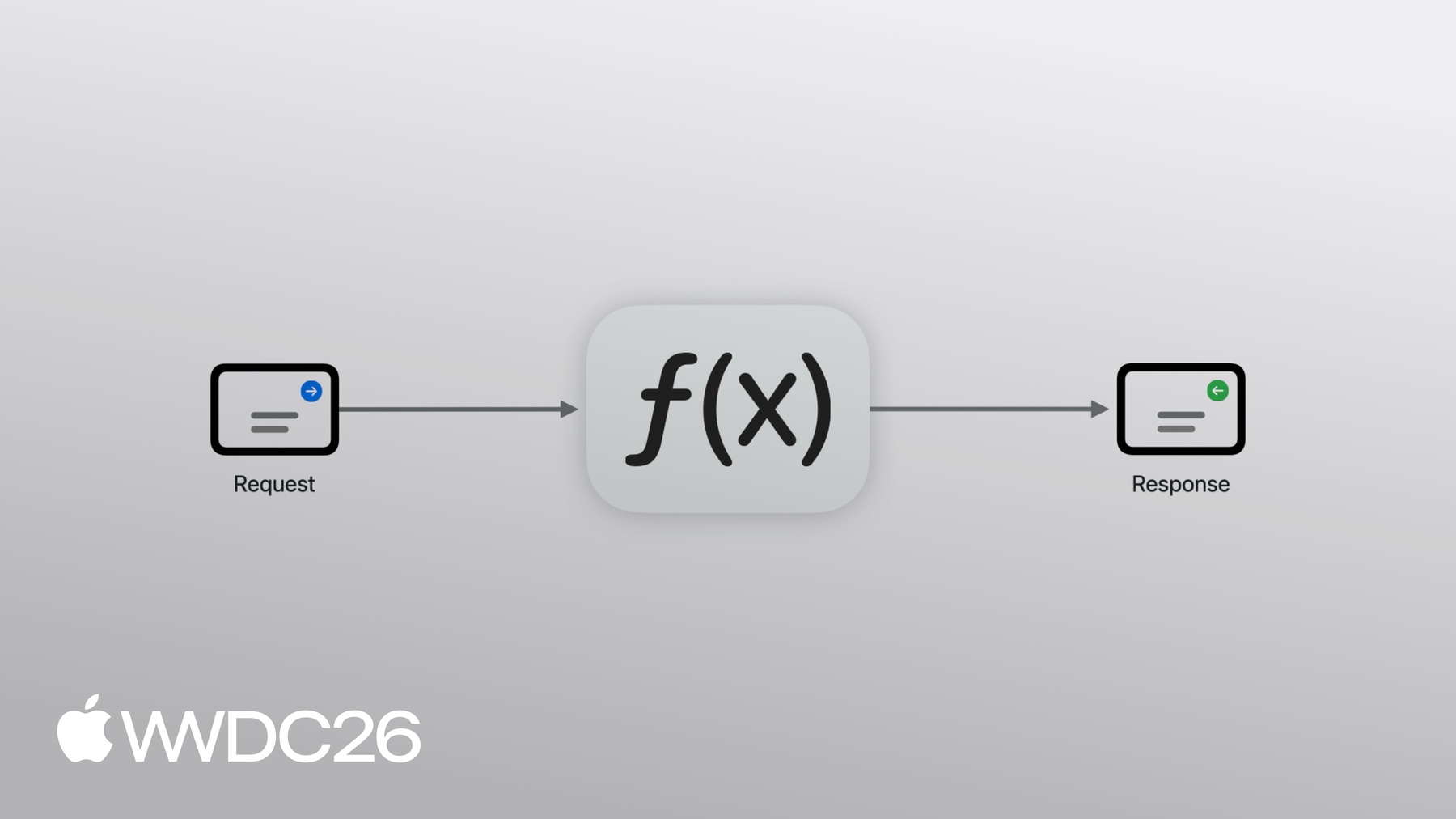
gRPC는 원격 프로시저 호출을 위한 프레임워크예요 CNCF 프로젝트이며 산업 표준으로 널리 채택되고 있어요 OpenAPI와 마찬가지로 명세서에서 생성된 코드로 작업하기 때문에 서비스 작업을 빠르게 시작할 수 있어요 하지만 gRPC에서 API는 HTTP가 아닌 입출력이 있는 함수 형태로 정의돼요 HTTP 방식이 아닌 형태로요
실제로 어떻게 작동하는지 살펴볼게요 근처에 새로운 카트 리그가 생기려 하고 있어요 모든 걸 추적하는 시스템이 있는데 일정부터 모든 실시간 레이스 데이터까지 담당해요 하지만 그 정보를 제공할 방법이 필요해요 저는 iOS 앱과 gRPC 서비스로 백엔드를 연동하는 작업을 하고 있었어요 앱에 몇 가지 뷰를 준비하고 샘플 데이터로 채워뒀어요 예정된 레이스 목록을 볼 수 있어요 각 레이스를 탭하면 더 자세한 정보를 볼 수 있어요 gRPC를 이용해 서버에서 콘텐츠를 가져오면 좋겠어요 레이스 일정을 반환하는 함수를 list races라고 부를 수 있어요 요청할 레이스 수를 인자로 호출할 수 있고 레이스 목록을 반환하게 돼요 원격 프로시저 호출로서 요청 메시지가 클라이언트에서 서버로 전송되고 서버가 함수를 실행해서 레이스 목록을 응답으로 돌려보내요 이 이론을 실제로 적용해 앱에서 gRPC Swift를 사용하는 방법을 살펴볼게요
서비스 API를 정의하는 것부터 시작할게요 그런 다음 Xcode 프로젝트에 필요한 의존성을 추가하고 gRPC 빌드 플러그인을 설정해 서비스 호출에 필요한 코드를 생성할게요 그다음 앱을 업데이트해 서버를 호출할 거예요 gRPC 서비스를 지정하는 가장 일반적인 형식은 Protocol Buffers라고 해요 줄여서 Protobuf라고 하죠
.proto 파일에서 ListRaces라는 하나의 RPC로 서비스를 정의할게요 입력으로 ListRacesRequest를 사용하고 출력으로 ListRacesResponse를 사용해요 요청 메시지에는 limit라는 필드가 하나 있어요 응답에 포함할 최대 레이스 수를 나타내는 정수로 응답에 포함될 최대 수량이에요 기본값은 100으로 설정했어요 메시지의 모든 필드에는 고유한 필드 번호가 부여돼요 응답 메시지에는 반복되는 Race 필드가 포함돼요 Race는 별도 메시지로 정의되며 이름 같은 정보를 담고 있어요 위치와 챔피언십은 문자열로, 랩 수는 정수로 저장돼요 시작 시간은 타임스탬프로 저장돼요 타임스탬프 타입은 Protobuf의 Well Known Types 중 하나로 다른 곳에 정의되어 있어서 임포트해야 해요 서비스를 정의했으니 Xcode로 전환해 gRPC 의존성을 추가할게요 코드 생성기도 설정할게요
시작하려면 프로젝트에 몇 가지 의존성을 추가해야 해요 프로젝트 편집기로 이동할게요
Package Dependencies 탭을 선택하고 더하기를 클릭할게요
먼저 grpc-swift-nio-transport 의존성을 추가할게요 고성능 네트워킹 코드를 제공하는 패키지로 오픈 소스 SwiftNIO 라이브러리 위에 구축되어 있어요
그다음 의존성을 추가할게요 grpc-swift-protobuf는 빌드 플러그인을 제공하는데 proto 파일에서 gRPC 코드를 생성해 줘요
의존성 설정이 완료됐으니 빌드 플러그인을 사용하도록 타깃을 설정할게요 앱 타깃을 선택할게요 Build Phases 탭을 선택하고 Run Build Tool Plug-ins 섹션을 펼쳐볼게요 더하기 아이콘을 클릭하고 GRPCProtobufGenerator를 선택해 추가를 클릭할게요
플러그인은 대상 디렉토리에서 proto 파일을 검색하며 JSON 설정 파일로 구성할 수 있어요 지금 타깃에 추가할게요
JSON 파일로 생성할 코드를 설정해요 앱이니까 메시지와 클라이언트만 필요해요 서버 코드는 필요 없어요 이제 앱을 다시 컴파일해 코드를 생성할 수 있어요 보안 조치로 플러그인을 처음 사용할 때 신뢰 여부를 묻는 메시지가 나타나요
설정이 모두 완료됐어요 이제 서비스를 호출할 준비가 됐어요 RaceScheduleView를 열게요
필요한 모듈을 가져올게요
코어 모듈은 공통 gRPC 런타임 컴포넌트를 제공하며 HTTP 모듈은 네트워킹 코드를 제공하고 SwiftProtobuf는 Protobuf 메시지와 상호작용할 수 있게 해줘요 다음으로 뷰에 task modifier를 추가할게요 요청을 만들 곳이에요 task 안에서 withGRPCClient 함수를 사용해 클라이언트를 만들 거예요 do catch 블록 안에 작성하고 지금은 오류를 출력할게요 gRPC Swift를 사용하면 네트워킹에 사용할 구현체를 설정할 수 있어요 Mac에서 로컬로 실행 중인 서버에 연결하는 SwiftNIO 기반 구현체를 사용할게요
클로저에 전달된 클라이언트는 서버에 대해서만 알고 있어요 서비스에 대해서는 아무것도 몰라요 여기서 생성된 코드가 활용돼요 SwiftKart 클라이언트를 만들고
gRPC 클라이언트로 초기화한 다음
요청을 만들고
list races RPC를 호출해 응답을 기다릴 거예요
마지막으로 새 데이터로 뷰를 업데이트할게요 서버의 응답을 매핑해서 뷰에서 사용하는 데이터 모델로 변환해요
이렇게 로컬 서버에서 레이스 일정을 가져왔어요 Finite Loops 재미있겠는데, 곧 시작하네요!
더 진행하기 전에 중요한 변경 사항이 하나 있어요
현재 앱은 뷰가 나타날 때마다 새 gRPC 클라이언트를 만들어요 이렇게 하면 각 뷰가 서버에 별도의 연결을 맺어야 해서 불필요한 지연이 발생해요 대신 앱이 클라이언트를 만들어 뷰 간에 공유해야 해요 연결을 재사용할 수 있도록요
앱의 환경을 통해 클라이언트를 전달할 수 있어요 클라이언트는 연결을 끊어야 해요 앱이 백그라운드로 진입할 때 리소스를 해제하기 위해서요 Xcode에서 미리 작성해 둔 클라이언트 매니저 코드를 추가할게요
그다음 앱 진입점을 열고 매니저 인스턴스를 만들게요
environment modifier를 통해 하위 뷰에서 사용할 수 있게 할게요 씬이 백그라운드 단계로 진입할 때 클라이언트 연결을 끊어야 해요 그러려면 씬 단계 프로퍼티를 만들고
변경 사항을 감시할게요
매니저 클래스는 지연 연결 방식으로 클라이언트를 요청받을 때 연결하니까 씬이 활성 상태로 진입할 때는 아무것도 할 필요 없어요 이제 RaceScheduleView에서 매니저를 사용할게요 뷰에 추가하고
프리뷰에서도 사용할 수 있게 할게요
마지막으로 withGRPCClient 호출을 매니저 호출로 교체할게요
이제 앱이 설정되고 Protobuf로 정의된 서비스 API에서 생성된 코드로 서비스와 통신해요 서비스 API 외에도 Protobuf는 메시지 교환 형식을 제공해요 SwiftProtobuf에는 코드 생성기가 있어서 메시지를 나타내는 Swift 타입을 직접 사용할 수 있어요 메시지를 나타내는 타입으로요 예를 들어 race 메시지를 만들고 관련 정보로 필드를 채울 수 있어요 gRPC가 클라이언트와 서버 사이에 메시지를 전송할 때 바이너리 표현으로 직렬화해요 이름 대신 고유한 필드 번호를 사용해 각 필드를 식별해요 그 결과 Protobuf 메시지는 동등한 JSON 메시지의 약 절반 크기예요 메시지 크기 감소는 모바일 앱에 아주 좋아요 데이터 전송을 최소화하면 네트워크 호출 성능이 향상돼요 네트워크 상태가 좋지 않을 때 특히 중요해요 이 효율성은 다른 환경에서도 훌륭해요 서비스 간 통신 같은 경우에요 프로세스 간 통신도 마찬가지예요 Apple의 오픈 소스 Containerization 프레임워크처럼요 gRPC Swift를 사용해 가상 소켓으로 통신하고 호스트 운영체제와 Linux 가상 머신 간에 데이터를 주고받아요 gRPC Swift는 클라우드 서비스에서도 핵심 요소예요 Private Cloud Compute나 iCloud Keychain, Photos, SharePlay 파일 공유 같은 서비스예요 하지만 외부 서비스만 지원하는 게 아니에요 gRPC는 내부 인프라 깊숙이 사용되고 있어요 OS 빌드 및 릴리스 시스템 같은 곳에서요 gRPC의 뛰어난 기능 중 하나는 스트리밍을 일급 지원한다는 거예요 list races 같은 많은 RPC는 서버에 단일 요청 메시지를 보내기만 해요 서버는 단일 응답 메시지로 답하죠 이것을 단항 RPC라고 해요 하지만 RPC는 요청과 응답 메시지를 스트리밍할 수 있어요 탐색할 RPC 유형이 세 가지 더 있어요 클라이언트 스트리밍 RPC는 클라이언트가 서버에 여러 메시지를 보내는 방식이에요 서버는 단일 응답 메시지로 답해요 각 카트가 텔레메트리 데이터를 서버로 스트리밍하는 것처럼요 서버 스트리밍 RPC에서 클라이언트는 서버에 단일 요청 메시지를 보내고 서버는 여러 응답 메시지로 답해요 라이브 텍스트 해설 피드 같은 실시간 업데이트를 생각해 보세요 마지막 유형은 양방향 스트리밍이에요 클라이언트와 서버가 서로 여러 메시지를 주고받을 수 있어요 앱에서 이걸 어떻게 활용할지 좋은 아이디어가 있어요 실시간 레이스 업데이트를 제공하는 거예요 요청 메시지는 서버에 알려줄 거예요 클라이언트가 어떤 이벤트를 구독했는지를요 응답 메시지는 관련 이벤트를 담아요 클라이언트가 관심 있는 이벤트가 바뀌면 서버에 더 많은 메시지를 보낼 수 있어요
제 앱은 Mac에서 실행 중인 서버에 요청하고 있어요 이 서버도 Swift로 작성됐어요 살펴볼게요 서버 설정은 간단해요 서버 객체를 만들고 트랜스포트로 초기화한 다음 제공할 서비스를 설정해요 서버를 시작하려면 serve만 호출하면 돼요 서비스는 하나의 타입이에요 빌드 플러그인이 생성한 프로토콜을 구현하는 타입이죠 아까 구현한 list races RPC를 볼 수 있어요 async 함수로 요청을 받아 응답을 반환해요 구현은 데이터베이스에서 레이스를 조회하고 메시지를 채운 다음 반환하면 돼요 스트리밍 RPC를 추가하려면 서비스 정의를 업데이트하고 서버로 전환해 코드를 다시 생성한 다음 새 RPC를 구현할 거예요 그게 완료되면 앱을 업데이트해 호출할게요 서비스 정의에 FollowRace RPC를 추가하는 것부터 시작할게요 이 RPC는 요청과 응답 메시지를 스트리밍하니까 입력과 출력 앞에 stream 키워드를 추가해야 해요 그다음 메시지를 정의해야 해요 요청 메시지에는 추적할 레이스 이름과 구독할 이벤트 유형 목록이 포함돼요 이것은 열거형으로 표현돼요 응답 타입에는 oneof 필드가 있어요 연관 값이 있는 Swift 열거형과 같은 개념이에요 메시지는 각 카트의 위치를 담거나 현재 레이스 순위를 담아요 이것들은 별도 메시지로 정의돼요 서비스 정의 업데이트가 완료됐으니 Xcode에서 서버로 전환해 새 RPC를 구현할게요 프로젝트를 빌드해 코드를 다시 생성할게요
프로토콜에 새 요건이 생겼는데 아직 구현하지 않아서 빌드 오류가 발생해요 스텁을 채울게요
스트리밍 때문에 list races RPC와는 조금 달라 보여요 요청 매개변수는 요청 메시지의 async 시퀀스예요 응답 매개변수는 객체인데 클라이언트에 응답 메시지를 쓰기 위한 거예요 두 개의 데이터 스트림을 동시에 처리해야 하니까 task group이 필요해요
첫 번째 요청 메시지를 기다려야 해요 추적할 레이스 이름을 알아야 하니까요 호출자가 관심 있는 이벤트도 알아야 해요 async 이터레이터를 만들고 첫 번째 메시지를 기다릴게요 이벤트를 mutex로 보호된 set에 저장할게요 두 개의 다른 task가 동시에 접근해야 하기 때문이에요 그다음 task group에 task를 추가할게요 이 task는 추적할 레이스 이름으로 라이브 레이스 트래커를 호출해요
이렇게 이벤트의 async 시퀀스를 받아서 필터링할 수 있어요 클라이언트가 현재 관심 있는 이벤트만 포함하도록요
필터링된 이벤트를 반복하고
빈 응답 메시지를 만들게요
그런 다음 이벤트를 분기하여 메시지를 채울게요 먼저 트래커에서 받은 카트 위치 배열을 RPC에서 사용하는 데이터 타입으로 매핑할게요 그다음 순위도 같은 방식으로 처리할게요
이제 메시지를 클라이언트에 쓸게요
아직 할 일이 몇 가지 남았어요 첫 번째는 요청 메시지를 계속 소비하는 거예요 호출자가 관심 있는 이벤트를 변경할 수 있으니까요 요청 스트림의 끝을 신호로 사용해서 클라이언트가 더 이상 이벤트를 원하지 않는다는 걸 알 수 있어요 task group에서 실행 중인 task를 취소해서 메시지 전송을 중단할 수 있어요 마지막으로 서버를 재시작해 클라이언트가 새 RPC를 호출할 수 있게 할게요
서비스에서 RPC 구현이 완료됐어요 이제 앱을 업데이트할 수 있어요 앱의 Xcode 프로젝트를 열고 proto 파일을 업데이트해 새 RPC와 메시지를 포함시킬게요
프로젝트를 빌드해 gRPC 코드를 다시 생성할게요
그다음 RaceInfoView로 이동할게요 그리고 아까 만든 LiveStreamView로 이동하는 NavigationLink를 추가할게요 그런 다음 라이브 스트림 뷰를 열게요
지도를 표시하는데 어노테이션을 그려요 레이스의 각 카트 위치를 나타내는 어노테이션이에요 툴바 버튼도 있어서 시트를 열면 라이브 리더보드를 볼 수 있어요 showLeaderboard 프로퍼티는 표시 여부를 추적해요 뷰에는 이미 프로퍼티가 있어요 필요한 다양한 상태 값을 저장하는 프로퍼티예요 RPC를 호출하고 서버에서 받은 데이터를 연결하기만 하면 돼요 먼저 앞에서 사용한 가져오기를 추가할게요 그다음 environment를 통해 클라이언트를 주입할게요
이전처럼 task를 만들고
manager.withClient를 호출할게요
그런 다음 kart 클라이언트를 만들고
FollowRace RPC를 호출할게요
단항 list races RPC와는 구조가 달라요 클로저가 두 개예요 하나는 요청 메시지를 쓰고 다른 하나는 응답 메시지를 처리해요 showLeaderboard 값이 변경될 때마다 요청 메시지를 보내야 해요 AsyncStream을 사용해 시간에 따른 변화를 추적하고 continuation을 프로퍼티로 저장할게요
showLeaderboard가 변경되면 새 값을 continuation에 yield할게요
task 안에서 AsyncStream과 continuation을 만들게요
스트림에 showLeaderboard의 현재 값을 yield해야 해요 초기값으로요 RPC의 첫 번째 클로저에서 스트림을 반복하고
각 값에 대해 서버에 메시지를 보낼 거예요
리더보드가 표시 중이면 standings 이벤트를 추가할게요
그런 다음 메시지를 서버에 쓸게요
응답 클로저에서 메시지를 반복하며 각 이벤트에 대해 뷰 상태를 업데이트할게요 이벤트를 처리하는 헬퍼 메서드를 사용할게요
이벤트를 분기하고 각각을 뷰에서 사용하는 데이터 타입으로 매핑할게요
카트 위치부터 시작할게요 그다음 순위도 같은 방식으로 처리할게요
마지막으로 응답 메시지를 반복하며 각 이벤트에 헬퍼를 호출할게요
확인해 볼게요
Apple Park에서 레이스가 곧 시작될 것 같아요 Rainbow Arches 방향으로 내려가고 있어요 이제 Duck Pond 방향으로 우회전하는 것 같아요 Monty가 선두이고 Pepper와 Bo가 바짝 뒤따르고 있어요 좋은데 아직 목표를 달성하지 못했어요 관중에게 정보를 제공하려는 목표 말이에요 서비스가 로컬에서 실행 중이니까요 클라우드에 배포해서 앱을 사용하는 모든 사람이 이용할 수 있게 해볼게요 서비스 호스팅에는 Google Cloud Platform을 사용하고 있지만 AWS나 Fly.io 같은 다른 플랫폼을 사용해도 돼요 접근 방식은 비슷하지만 정확한 단계는 달라요 대부분의 서버는 Linux를 사용하는데 오늘 배포할 곳도 Linux예요 코드는 변경할 필요 없어요 서버 실행 파일을 런타임 의존성과 함께 컨테이너 이미지로 패키징해야 해요 그런 다음 이미지를 클라우드 제공업체의 이미지 레지스트리에 게시할게요 그 후 배포를 만들게요 마지막으로 앱을 업데이트해 배포된 서비스를 대상으로 할게요 먼저 Containerfile을 만들게요 컨테이너 이미지를 빌드하는 데 필요한 단계를 설명하는 파일이에요 기본 이미지로 swift:latest를 사용할게요 다음으로 작업 디렉토리를 설정하고 패키지 매니페스트와 소스 파일을 복사할게요 그런 다음 서버를 릴리스 모드로 빌드하고 정해진 위치에 복사할게요 이 시점에서 이미지에 서버 실행 파일이 있는데 Swift 툴체인 전체도 함께 포함되어 있어요 서버를 실행하는 데 그 모든 것이 필요하지는 않고 이미지 크기가 필요 이상으로 커지게 돼요
다단계 빌드를 사용해서 바이너리를 swift:slim 런타임 이미지로 복사할게요 마지막으로 포트를 노출하고 서버를 진입점으로 설정할게요
Containerfile 작성이 완료됐어요 이제 이미지를 빌드하고 게시해야 하는데 컨테이너 레지스트리에요 시간이 몇 분 걸려서 미리 게시해 둔 걸 사용할게요 터미널에서 gcloud run deploy 명령을 사용할 수 있어요
배포 이름, 이미지 이름, 지역을 제공할게요 그다음 서비스가 http2를 사용한다고 지정해야 해요 그리고 인증되지 않은 요청도 허용해야 해요
배포가 완료되면 서비스 URL이 출력되는데 클라이언트를 업데이트할 때 필요하니까 지금 복사해 둘게요
앱으로 돌아가서 ClientManager를 열게요 연결 대상을 deploy 명령에서 나온 서비스 DNS 이름으로 업데이트하고 deploy 명령에서 받은 이름으로요 그런 다음 전송 보안 옵션을 변경해 TLS를 활성화할게요 plaintext에서 TLS로 변경해요
테스트해 볼게요
Finite Loops 레이스 시작을 방금 목격했네요
Pepper의 최악의 출발이에요 Monty가 1위를 차지하고 Mycroft와 Kiko가 바짝 뒤따르고 있어요
드라이버들이 Infinite Loop 캠퍼스로 진입하고 있어요
Pepper가 몇 순위를 올렸어요
정말 멋진 레이스가 펼쳐질 것 같아요
gRPC Swift를 사용하는 방법을 보여드렸어요 앱에서 멋진 실시간 경험을 구축하는 방법과 앱과 서버 간 통신을 어떻게 단순화할 수 있는지 서비스 정의와 코드 생성부터 서비스 구현과 클라우드 배포까지 모두 살펴봤어요 그리고 이건 시작에 불과해요 gRPC Swift에는 수많은 내장 기능이 있어요 앱을 프로토타입에서 프로덕션으로 발전시키는 데 도움이 되는 기능들이에요 다른 Swift 패키지와의 통합이든 Swift OTel이나 Swift service lifecycle이든요 커스텀 트랜스포트와 네임 리졸버 같은 고급 연결 관리 기능이나 클라이언트 측 로드 밸런싱도 있어요 이제 앱에서 gRPC를 사용할 준비가 됐어요 앱과 서버 간 상호작용의 일부를 프로토타입으로 만들어 보고 gRPC Swift가 작업 흐름을 얼마나 간단하게 만드는지 확인해 보세요 튜토리얼을 시도해 보거나 GitHub에서 제공되는 프로젝트 저장소의 예제를 활용해 보세요 이 프로젝트는 오픈 소스라서 기여도 할 수 있어요 질문을 올리거나 문서를 개선하거나 새 기능을 제안하고 구현하는 방식으로요 시청해 주셔서 감사합니다 트랙에서 만나요!
-
-
3:38 - ListRaces RPC definition
edition = "2024"; import "google/protobuf/timestamp.proto"; service SwiftKartService { rpc ListRaces(ListRacesRequest) returns (ListRacesResponse); } message ListRacesRequest { int32 limit = 1 [default = 100]; } message ListRacesResponse { repeated Race races = 1; } message Race { string name = 1; string location = 2; google.protobuf.Timestamp start_time = 3; int32 laps = 4; string championship = 5; } -
5:55 - grpc-swift-proto-generator-config.json
{ "generate": { "clients": true, "servers": false, "messages": true } } -
6:24 - Add gRPC imports
import GRPCCore import GRPCNIOTransportHTTP2 import SwiftProtobuf -
6:38 - Create a gRPC client connected to a local server
.task { do { try await withGRPCClient( transport: .http2NIOTS( address: .ipv4(host: "127.0.0.1", port: 8080), transportSecurity: .tls ) ) { client in <#code#> } } catch { print("gRPC error: \(error)") } } -
7:14 - Call the ListRaces RPC and update the view
.task { do { try await withGRPCClient( transport: .http2NIOTS( address: .ipv4(host: "127.0.0.1", port: 8080), transportSecurity: .tls ) ) { client in let kart = SwiftKartService.Client(wrapping: client) let request = ListRacesRequest() let response = try await kart.listRaces(request) self.races = response.races.map { race in RaceInfo( name: race.name, location: race.location, startTime: race.startTime.date, championship: race.championship, laps: Int(race.laps), drivers: race.drivers ) } } } catch { print("gRPC error: \(error)") } } -
8:30 - ClientManager.swift
import GRPCCore import GRPCNIOTransportHTTP2 import Synchronization import SwiftUI @Observable final class ClientManager: Sendable { fileprivate let state = Mutex(State.disconnected) static func makeTransport() throws -> HTTP2ClientTransport.TransportServices { try .http2NIOTS( target: .ipv4(address: "127.0.0.1", port: 8080), transportSecurity: .plaintext ) } func withClient( body: (_ client: GRPCClient<HTTP2ClientTransport.TransportServices>) async throws -> Void ) async throws { let client = try connectIfNecessary() try await body(client) } private func connectIfNecessary() throws -> GRPCClient<HTTP2ClientTransport.TransportServices> { try self.state.withLock { state in try state.connectIfNecessary() } } func disconnect() { let client = self.state.withLock { state in state.disconnect() } client?.beginGracefulShutdown() } } extension ClientManager { enum State { case connected(GRPCClient<HTTP2ClientTransport.TransportServices>, Task<Void, any Error>) case disconnected } } extension ClientManager.State { mutating func connectIfNecessary() throws -> GRPCClient<HTTP2ClientTransport.TransportServices> { switch self { case .connected(let client, _): return client case .disconnected: let client = try GRPCClient(transport: ClientManager.makeTransport()) let task = Task { try await client.runConnections() } self = .connected(client, task) return client } } mutating func disconnect() -> GRPCClient<HTTP2ClientTransport.TransportServices>? { switch self { case .connected(let client, _): self = .disconnected return client case .disconnected: return nil } } } -
8:39 - Propagate ClientManager to child views
import SwiftUI @main struct SwiftKartApp: App { let manager = ClientManager() var body: some Scene { WindowGroup { RaceScheduleView() .environment(manager) } } } -
8:52 - Disconnect ClientManager when the scene enters the background phase
import SwiftUI @main struct SwiftKartApp: App { let manager = ClientManager() @Environment(\.scenePhase) private var scenePhase var body: some Scene { WindowGroup { RaceScheduleView() .environment(manager) } .onChange(of: scenePhase) { _, newPhase in switch newPhase { case .background : manager.disconnect() case .inactive, .active: break @unknown default: break } } } } -
9:12 - Inject ClientManager into the view via @Environment
@Environment(ClientManager.self) var manager -
9:21 - Replace withGRPCClient with manager.withClient
.task { do { try await manager.withClient { client in let kart = SwiftKartService.Client(wrapping: client) let request = ListRacesRequest() let response = try await kart.listRaces(request) self.races = response.races.map { race in RaceInfo( name: race.name, location: race.location, startTime: race.startTime.date, championship: race.championship, laps: Int(race.laps), drivers: race.drivers ) } } } catch { print("gRPC error: \(error)") } } -
9:41 - Using SwiftProtobuf
var race = Race() race.name = "Duck Pond Dash" race.location = "Apple Park, Cupertino" race.startTime = .init(roundingTimeIntervalSince1970: 1_781_198_600) race.laps = 6 race.championship = "Corporate Cup" race.drivers = ["Monty", "Pepper", "Mycroft", "Pancakes", "Duke", "Kiko", "Sissi", "Bo"] try race.serializedBytes() -
12:32 - Server
let server = GRPCServer( transport: .http2NIOPosix( address: .ipv4(host: "127.0.0.1", port: 8080), transportSecurity: .plaintext ), services: [Service()] ) try await server.serve() -
12:45 - Service
struct Service: SwiftKartService.SimpleServiceProtocol { private let database = RaceDB() func listRaces( request: ListRacesRequest, context: ServerContext ) async throws -> ListRacesResponse { var response = ListRacesResponse() response.races = await database.listRaces(atMost: request.limit) return response } } -
13:20 - swift_kart_service.proto
edition = "2024"; import "google/protobuf/duration.proto"; import "google/protobuf/timestamp.proto"; service SwiftKartService { rpc ListRaces(ListRacesRequest) returns (ListRacesResponse); rpc FollowRace(stream FollowRaceRequest) returns (stream FollowRaceResponse); } message ListRacesRequest { int32 limit = 1 [default = 100]; } message ListRacesResponse { repeated Race races = 1; } message Race { string name = 1; string location = 2; google.protobuf.Timestamp start_time = 3; int32 laps = 4; string championship = 5; repeated string drivers = 6; } message FollowRaceRequest { string race_name = 1; repeated RaceEventType event_types = 2; } enum RaceEventType { RACE_EVENT_TYPE_UNSPECIFIED = 0; RACE_EVENT_TYPE_KART_LOCATIONS = 1; RACE_EVENT_TYPE_STANDINGS = 2; } message FollowRaceResponse { oneof event { KartLocations locations = 1; Standings standings = 2; } } message KartLocations { message Kart { int32 number = 1; double latitude = 2; double longitude = 3; google.protobuf.Timestamp recorded_at = 4; } repeated Kart karts = 1; } message Standings { message Entry { int32 kart_number = 1; google.protobuf.Duration gap_to_leader = 2; int32 position = 3; int32 lap = 4; } repeated Entry entries = 1; } -
14:16 - FollowRace stub
func followRace( request: RPCAsyncSequence<FollowRaceRequest, any Error>, response: RPCWriter<FollowRaceResponse>, context: ServerContext ) async throws { throw RPCError(code: .unimplemented, message: "FollowRace is unimplemented") } -
14:38 - Implement the FollowRace RPC
func followRace( request: RPCAsyncSequence<FollowRaceRequest, any Error>, response: RPCWriter<FollowRaceResponse>, context: ServerContext ) async throws { try await withThrowingTaskGroup { group in var iterator = request.makeAsyncIterator() guard let first = try await iterator.next() else { return } let eventTypes = Mutex(Set(first.eventTypes)) group.addTask { let events = tracker.events(forRace: first.raceName).filter { event in eventTypes.withLock { $0.contains(event.type) } } for await event in events { var message = FollowRaceResponse() switch event { case .locations(let locations): message.locations.karts = locations.map { location in var kart = KartLocations.Kart() kart.number = Int32(location.number) kart.latitude = location.latitude kart.longitude = location.longitude return kart } case .standings(let standings): message.standings.entries = standings.map { standing in var entry = Standings.Entry() entry.gapToLeader = .init(rounding: standing.delta, rule: .towardZero) entry.kartNumber = Int32(standing.kartNumber) entry.lap = Int32(standing.lap) entry.position = Int32(standing.position) return entry } } try await response.write(message) } } while let next = try await iterator.next() { eventTypes.withLock { $0 = Set(next.eventTypes) } } group.cancelAll() } } -
16:39 - swift_kart_service.proto
edition = "2024"; import "google/protobuf/duration.proto"; import "google/protobuf/timestamp.proto"; service SwiftKartService { rpc ListRaces(ListRacesRequest) returns (ListRacesResponse); rpc FollowRace(stream FollowRaceRequest) returns (stream FollowRaceResponse); } message ListRacesRequest { int32 limit = 1 [default = 100]; } message ListRacesResponse { repeated Race races = 1; } message Race { string name = 1; string location = 2; google.protobuf.Timestamp start_time = 3; int32 laps = 4; string championship = 5; repeated string drivers = 6; } message FollowRaceRequest { string race_name = 1; repeated RaceEventType event_types = 2; } enum RaceEventType { RACE_EVENT_TYPE_UNSPECIFIED = 0; RACE_EVENT_TYPE_KART_LOCATIONS = 1; RACE_EVENT_TYPE_STANDINGS = 2; } message FollowRaceResponse { oneof event { KartLocations locations = 1; Standings standings = 2; } } message KartLocations { message Kart { int32 number = 1; double latitude = 2; double longitude = 3; google.protobuf.Timestamp recorded_at = 4; } repeated Kart karts = 1; } message Standings { message Entry { int32 kart_number = 1; google.protobuf.Duration gap_to_leader = 2; int32 position = 3; int32 lap = 4; } repeated Entry entries = 1; } -
16:40 - swift_kart_service.proto
edition = "2024"; import "google/protobuf/timestamp.proto"; service SwiftKartService { rpc ListRaces(ListRacesRequest) returns (ListRacesResponse); } message ListRacesRequest { int32 limit = 1 [default = 100]; } message ListRacesResponse { repeated Race races = 1; } message Race { string name = 1; string location = 2; google.protobuf.Timestamp start_time = 3; int32 laps = 4; string championship = 5; repeated string drivers = 6; } -
16:56 - Navigation link to LiveStreamView
NavigationLink(destination: LiveStreamView(race: race)) { Text("Live stream") } -
17:32 - Call the FollowRace RPC in the LiveStreamView
import SwiftUI import GRPCCore import GRPCNIOTransportHTTP2 import SwiftProtobuf struct LiveStreamView: View { private let race: RaceInfo @Environment(ClientManager.self) var manager @State private var tracking: KartTrackingViewModel @State private var standings: [StandingsEntry] = [] @State private var showLeaderboard = false @State private var continuation: AsyncStream<Bool>.Continuation? init(race: RaceInfo) { self.race = race self.tracking = KartTrackingViewModel(race: race) } var body: some View { VStack { KartTrackingMapView(viewModel: tracking) .ignoresSafeArea() .onAppear { tracking.start() } .onDisappear { tracking.stop() } } .onChange(of: showLeaderboard) { _, newValue in continuation?.yield(newValue) } .sheet(isPresented: $showLeaderboard) { LeaderboardView(race: race, standings: standings) .presentationDetents([.fraction(0.3), .medium, .large]) .presentationBackgroundInteraction(.enabled) } .toolbar { Toggle(isOn: $showLeaderboard) { Label("Leaderboard", systemImage: "list.number") } } .toolbarBackgroundVisibility(.visible, for: .navigationBar) .task { do { let (stream, continuation) = AsyncStream.makeStream(of: Bool.self) self.continuation = continuation continuation.yield(showLeaderboard) try await manager.withClient { client in let kart = SwiftKartService.Client(wrapping: client) try await kart.followRace { requestStream in for await showLeaderboard in stream { var message = FollowRaceRequest() message.raceName = race.name message.eventTypes = [.kartLocations] if showLeaderboard { message.eventTypes.append(.standings) } try await requestStream.write(message) } } onResponse: { responseStream in for try await message in responseStream.messages { if let event = message.event { await handleEvent(event) } } } } } catch { print("gRPC error: \(error)") } } } @MainActor private func handleEvent(_ event: FollowRaceResponse.OneOf_Event) { switch event { case .locations(let locations): self.tracking.updateKartCoordinates( locations.karts.map { TrackedKart(number: $0.number, latitude: $0.latitude, longitude: $0.longitude) } ) case .standings(let standings): self.standings = standings.entries.map { StandingsEntry( kartNumber: $0.kartNumber, secondsToLeader: $0.gapToLeader.timeInterval, position: $0.position, lap: $0.lap ) } } } } #Preview { NavigationStack { LiveStreamView(race: .example4) .environment(ClientManager()) } } -
20:55 - Containerfile
FROM swift:latest AS builder # Copy sources into /app WORKDIR /app COPY Package.swift Package.resolved . COPY Sources/ Sources/ # Build the server RUN swift build -c release --product server RUN cp "$(swift build -c release --show-bin-path)/server" /usr/bin/server # Copy the binary from the builder into a smaller runtime image. FROM swift:slim COPY --from=builder /usr/bin/server /usr/bin/server EXPOSE 8080 ENTRYPOINT ["/usr/bin/server"] -
21:56 - Deploy service
gcloud run deploy wwdc-demo-server \ --image us-central1-docker.pkg.dev/wwdc26/wwdc-demo-server/wwdc-demo-server:latest \ --region us-central1 \ --use-http2 \ --allow-unauthenticated -
22:22 - Target deployed service
static func makeTransport() throws -> HTTP2ClientTransport.TransportServices {
    try .http2NIOTS(
        target: .dns(host: "wwdc-demo-server-863666503339.us-central1.run.app"),
        transportSecurity: .tls
    )
}
-