
-
通过 Bluetooth Channel Sounding 查找你的配件
开始使用 Channel Sounding,为你的蓝牙配件带来距离和方向感知功能。深入探索全新的 Nearby Interaction 和 Core Bluetooth API,并详细了解你需要进行哪些配件端更改。在优化功耗的同时,确保顺畅灵敏的体验。
章节
- 0:00 - 简介
- 0:50 - 概览
- 3:17 - Core Bluetooth API
- 4:34 - Nearby Interaction API
- 7:05 - 硬件技巧
资源
- Measuring distance between devices using Channel Sounding
- AccessorySetupKit
- Nearby Interaction
- Core Bluetooth
相关视频
WWDC24
WWDC21
-
搜索此视频…
大家好!我是 Gretchen, 我在 Core Bluetooth 团队工作。 今天,我很高兴介绍一种 发现附近蓝牙配件的方法, 使用 Channel Sounding。 首先,我将给出一些关于 如何使用 Channel Sounding 的设想, 以及它的工作原理。 然后我将介绍 如何在你的 App 中实现它, 使用 Core Bluetooth 获取距离, 或使用 Nearby Interaction 获取 到配件的距离和方向。
接下来, 我将提供一些关于构建 支持 Channel Sounding 硬件的技巧。 最后,我将介绍一些后续步骤。
让我们从概述开始。
想象我正在举办一个派对。
我在室内用烤箱烹饪, 后院里还开着一台烟熏炉。
两处各放了一个 蓝牙温度计, 帮助我把所有食物都做得恰到好处。 我收到一条通知, 提示我的一个温度计 已达到我设定的温度。
当我打开 App 时, 显示探针在我右侧 8 米处。 那一定是烟熏炉!
有了 Channel Sounding, 我就不会混淆温度探针了。 我可以测量到每个探针的距离!
在 iOS 上有几种方法 可以测量距离 和方向 到第三方配件。
为了获得最佳精度, 你可以在配件中 添加超宽带芯片组, 并在 App 中 使用 Nearby Interaction 框架。
有关详情, 请观看视频"探索与第三方配件的 Nearby Interaction"。 但如果你的配件 只有蓝牙芯片组, 那么蓝牙 Channel Sounding 是最佳选择。
你可能曾经使用 RSSI 来估算距离, 但使用 Channel Sounding 可以实际测量距离。 我们鼓励你尝试 Channel Sounding, 用于那些 App 可以 从更高精度中获益的场景。 那么,Channel Sounding 究竟是如何工作的?
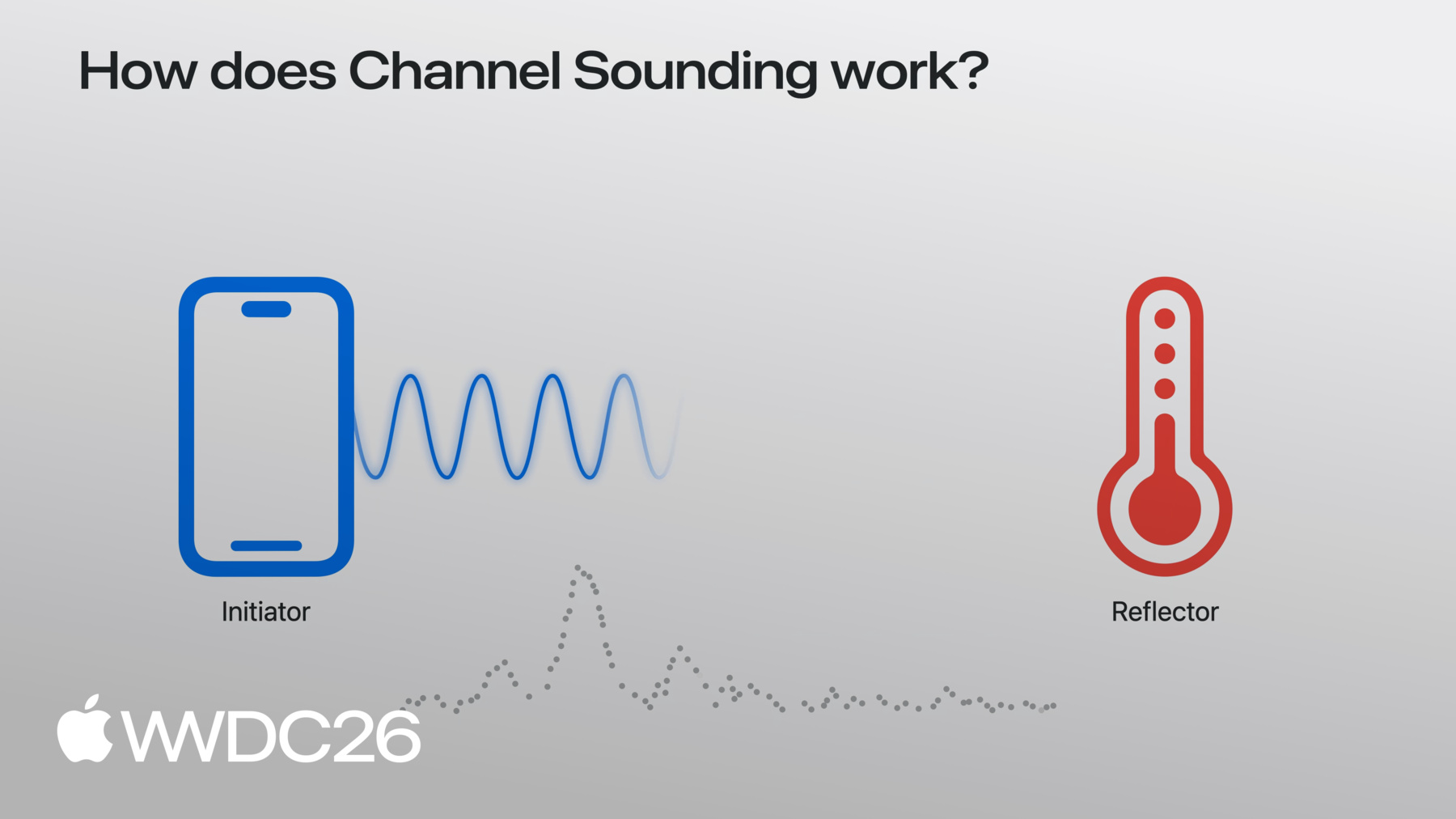
假设我们有一部 iPhone, 已与蓝牙配件配对并连接。
在这个场景中, iPhone 被称为发起方, 配件被称为反射方。
iPhone 向配件发送信号 或音调, 配件将该音调反射回来。
iPhone 测量信号 在传输过程中的变化, 从一端到另一端,再返回。
通过在 2.4GHz 频段的 各个信道上重复此过程, iPhone 观察这些反射音调 在各信道间的变化速率, 从一个信道到下一个, 并利用这一点来估算 发起方与反射方之间的距离。 这个测量距离的过程 称为一次程序(procedure)。
那么,如何在 App 中 执行 Channel Sounding? 如果只需要距离, 可以使用 Core Bluetooth。 开始之前, 请确保你的配件 已完成配对和设置, 使用 AccessorySetupKit, 并通过 Core Bluetooth 连接。 你可以参阅文档 了解更多操作详情。 现在我们来看一下 测量距离的代码。
首先,检查本地 iOS 设备 是否支持 Channel Sounding, 使用 CBCentralManager.supportsFeatures 方法。
获得已连接的 CBPeripheral 后, 调用 startChannelSoundingSession 于 CBPeripheral 对象上。
iOS 将反复执行 Channel Sounding 程序。 每次程序完成后,
委托方法 peripheral didReceive results 将被调用, 并返回以米为单位的测量距离。
当你准备结束 Channel Sounding 会话时, 调用 cancelChannelSoundingSession。
会话结束时, 委托方法 peripheral didCompleteChannelSoundingSession 将被调用。
接下来, 我将介绍如何使用 Nearby Interaction 来测量距离和方向。
同样, 确保你的配件已通过 AccessorySetupKit 完成配对和设置, 并通过 CoreBluetooth 连接。 在创建 Channel Sounding 会话之前, 检查本地 iOS 设备 是否支持它, 使用 supportsBluetoothChannelSounding 方法。
然后创建一个配置对象, 传入来自 CoreBluetooth 的 peripheral.identifier 作为 bluetoothChannelSoundingIdentifier。
为了获取方向, 需要 CameraAssistance。 如有需要,请务必启用。
最后,创建你的 NISession, 设置委托, 并使用刚创建的 新配件配置运行它。
如果 App 知道 配件是否正在移动或静止, 你可以告知 Nearby Interaction, 它将使用该信息 生成更好的方向估算。 在会话上调用 updateMotionState, 传入 accessory object.discoveryToken。
例如, 如果配件是 固定在墙上的标签,传入 .stationary。 如果它附在 移动物体上,传入 .moving。
委托回调 与 UWB 所得结果相同。
你将收到带有距离和方向的 NINearbyObjects 更新。
距离和方向结果 均受益于原始蓝牙 Channel Sounding 测量 与相机输入的融合。
请记住,距离和方向 均为可选项。 如果 Channel Sounding 测量失败, 距离可能为 nil。
iOS 会自动过滤异常值, 并平滑结果 以提供更好的用户体验。 在 iOS 27 中,Channel Sounding 在 App 处于前台时使用。 当 App 移至后台时, Channel Sounding 会话 将被暂停。
还请注意, 如果其他蓝牙 或 Wi-Fi 活动增加, iOS 可能会降低 Channel Sounding 测量的频率。 Channel Sounding 可在 搭载 N1 芯片的 iPhone 上使用。
现在我将介绍 如何让配件良好配合 iOS 上的 Channel Sounding。
你的配件必须支持 Bluetooth 6.3, 并且需要内联 PCT 功能。
iOS 使用基于相位的测距, 因此你的芯片组 还必须支持 mode-0 和 mode-2, 如蓝牙规范所定义。
T_FCS 是音调之间的 间隔时序。 请确保你的配件 支持至少 100µs 的 T_FCS。
好了,你已经了解了 Channel Sounding 的全部内容,接下来呢? 用兼容的配件 试用这些 API。 想象一下,测量距离将如何 改善用户与 App 的交互方式。 在开发者论坛上提出你的问题, 并通过“反馈助理” 向我们发送反馈。
-
-
3:43 - Start a Core Bluetooth Channel Sounding session
import CoreBluetooth func isChannelSoundingSupported() -> BOOL { guard centralManager.state == .poweredOn else { return } if #available(iOS 27.0, *) { // Check current device supports Bluetooth Channel Sounding return CBCentralManager.supportsFeatures(.channelSounding) } } func startChannelSounding(_ peripheral: CBPeripheral) { guard peripheral.isConnected else { return } if #available(iOS 27.0, *) { // Step 1: Create a CBChannelSoundingSessionConfiguration let config = CBChannelSoundingSessionConfiguration(role: .initiator) // Step 2: Start the channel sounding session peripheral.startChannelSoundingSession(config) } } -
4:09 - Receive distance results and cancel a session
import CoreBluetooth // Receive distance results func peripheral(_ peripheral: CBPeripheral, didReceive results: CBChannelSoundingProcedureResults?, error: Error?) { guard let results = results else { return } let distance = results.distance // Do something with distance } // Cancel a Channel Sounding session func cancelChannelSounding(_ peripheral: CBPeripheral) { guard peripheral.isConnected else { return } if #available(iOS 27.0, *) { // Cancel the channel sounding session peripheral.cancelChannelSoundingSession(config) } } func peripheral(_ peripheral: CBPeripheral, didCompleteChannelSoundingSession error: Error?) { // Session is complete } -
4:41 - Start a Nearby Interaction Channel Sounding session
import CoreBluetooth import NearbyInteraction // Configure a Nearby Interaction Channel Sounding session func startChannelSoundingThroughNearbyInteraction(_ peripheral: CBPeripheral) { if #available(iOS 27.0, *) { // Step 1: Check current device supports Bluetooth Channel Sounding guard NISession.deviceCapabilities.supportsBluetoothChannelSounding else { return } // Step 2: Create an NINearbyAccessoryConfiguration let config = NINearbyAccessoryConfiguration( bluetoothChannelSoundingIdentifier: peripheral.identifier, previousChannelSoundingIdentifier: nil) // Step 3: Enable camera assistance for direction support if NISession.deviceCapabilities.supportsCameraAssistance { config.isCameraAssistanceEnabled = true } } } -
5:19 - Run a Nearby Interaction Channel Sounding session
import CoreBluetooth
import NearbyInteraction

// Run a Nearby Interaction Channel Sounding session
func runChannelSoundingThroughNearbyInteraction(_ config: NINearbyAccessoryConfiguration) {
    // Create an NISession
    let session = NISession()
    session.delegate = self
    // Run the NISession with the accessory configuration
    session.run(config)
}

// Improve Nearby Interaction direction outputs
func updateAccessoryMotionState(_ isMoving: Bool) {
    NIMotionActivityState motionState = isMoving ? .moving : .stationary

    // Tell NISession about.the accessory's motion state
    session.updateMotionState(motionState, forObjectWithToken: object.discoveryToken)
}

// Receive NISession updates
func session(_ session: NISession, didUpdate nearbyObjects: [NINearbyObjects]) {
    guard let object = nearbyObjects.first else { return }

    if let distance = object.distance {
        // Do something with distance
    }

    if let direction = object.horizontalAngle {
        // Do something with horizontal angle
    }
}
-