

-
使用 fm CLI 和 Python SDK 构建 AI 驱动的脚本
探索在 macOS 上充分利用 Apple Foundation Models 的各种新方法。适用于 Python 的 Foundation Models SDK 支持与 Python 生态系统中的常用工具和评估包集成。了解如何使用 macOS 27 中推出的全新 fm 命令来简化脚本编写、实现模型工作流程自动化,并加速开发流程。
章节
- 0:00 - 简介
- 1:22 - fm CLI 和 Python SDK 简介
- 3:23 - 命令行工具
- 5:02 - fm respond 和结构化输出
- 6:11 - 借助实现 fm 文件管理自动化
- 8:52 - Python SDK
- 9:42 - 提示词发送、工具调用和引导式生成
- 10:44 - 用 Python 构建评估管道
- 15:20 - 后续步骤
资源
相关视频
WWDC26
-
搜索此视频…
嗨 我是Eric Gourlaouen 我是Foundation Models Framework 团队的工程师 今天 我想介绍一些新方式 让你利用Apple Foundation Models 在macOS上 在WWDC25 我们推出了 Swift版Foundation Models Framework 你可以在App中使用它提示 设备端Apple Foundation Model 它与引导生成等功能 一同推出 用于生成结构化输出 以及Tool Calling 让模型与App上下文交互
macOS 27和iOS 27 为框架带来了许多新功能 比如在提示中 传递图像的支持 以及对服务器模型的访问 让你的App通过相同的Swift API 利用任意大型语言模型 使用Foundation Models Framework 可以轻松利用Apple Foundation Models的强大功能 你可以将这些模型用于 从文本提取与分析 到构建高级智能体工作流 设置简单 无需API密钥 也无需支付云API费用 但到目前为止 这些模型 只能从Swift代码中访问 今年 我们推出了在macOS上访问 Apple Foundation Models的新方式 我们推出了新的命令行工具 名为fm 以及适用于Python的 全新Foundation Models SDK fm命令行工具随macOS 27预装 它是快速测试提示词 的绝佳工具 可直接在终端中使用 或集成到自动化流程中 它让你能轻松测试 模型提示词 无需在Xcode中重新构建项目
使用这个命令行工具非常简单 只需打开终端窗口 输入fm respond并填写提示词
然后按下回车 稍等片刻 就能看到 模型的响应
适用于Python的Foundation Models SDK 是我们访问设备端模型 的另一种新方式 它支持Foundation Models Framework的核心功能 如Tool Calling和引导生成 如果你是使用过Foundation Models 框架的Swift开发者 会发现API非常熟悉 如果你是机器学习工程师 可能比起Swift更多使用Python 在这种情况下 使用此SDK可以轻松在 Python代码中使用设备端模型
Python拥有丰富的 开源软件包生态系统 用于机器学习和数据科学 通过Python SDK 你可以 用Python编写评估流水线 并利用这些软件包 量化功能的质量 而且由于Python是一种脚本语言 你可以快速测试提示词 查看结果并进行迭代 让我们深入了解 这些新选项的可能性 我将首先介绍 新的fm命令行工具 我们将了解其基本用法 然后展示如何 用它创建自动化脚本 接下来 我将介绍Python SDK 我将展示如何与模型交互 以及如何利用 SDK的高级选项 然后我将通过一个案例研究 展示如何使用Python工具 分析提示词输出 并提升App的质量
让我们从讨论命令行工具fm开始 从macOS 27开始 这个命令行工具随Mac预装 可直接从Terminal App使用 要开始使用fm 只需打开 Terminal并输入fm
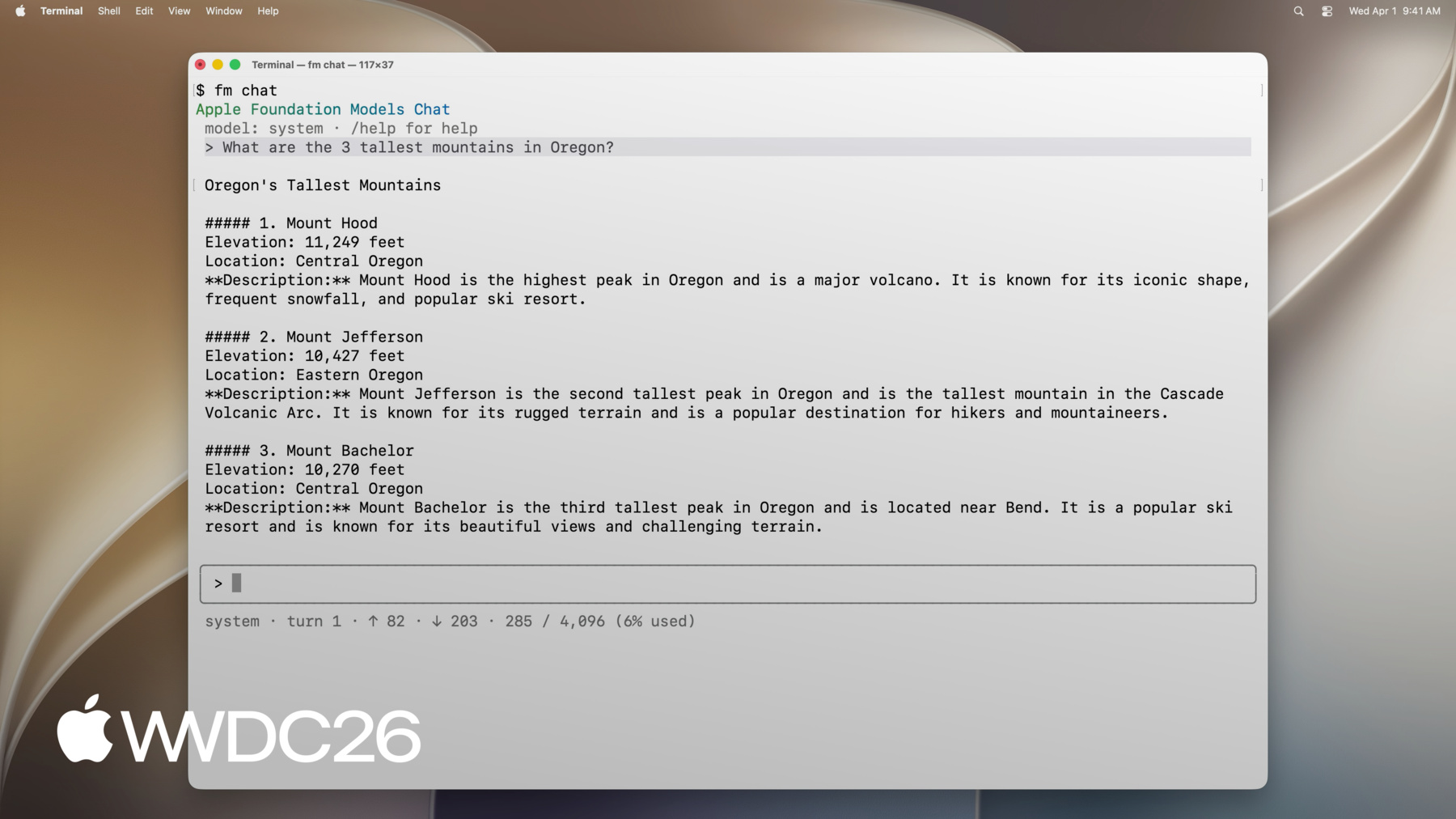
你可以看到可用命令列表 例如 你可以使用respond 提示模型并返回响应 使用chat启动交互界面 schema创建架构等 为了展示fm的功能 让我们试试fm chat
通过这个新的终端界面 我可以开始对话 直接在终端中 与设备端模型交互 我可以先提出第一个问题
然后提出后续问题
fm chat附带了多个命令 例如 通过/model 我可以将对话切换为使用 Private Cloud Compute模型
或通过/save 保存当前对话 以便稍后继续
使用fm chat的互动会话 非常适合对模型进行初步了解 如果你正在探索新想法 可以测试模型 看看 它对提示词的表现 当你想要内联响应时 比如在脚本中 请使用命令fm respond 在终端中运行 带提示词的fm respond 你将收到模型输出的响应
fm respond有多个选项 比如model选项 让你提示 Private Cloud Compute模型 或image选项 在提示中包含图像 就像使用Swift框架一样 我可以使用模型 生成结构化输出 使用命令fm schema object 我可以创建一个架构 然后通过fm respond 配合schema选项来使用它
还有更多可能对你有用的选项 要查看所有选项 请使用help选项 正如你目前看到的 fm命令行工具让你 可以使用设备端模型 或Private Cloud Compute上的 Apple Foundation Model 默认情况下 它使用 随macOS附带的设备端模型 且该模型始终可用
你也可以使用Private Cloud Compute上的 Apple Foundation Model 但有使用限制 它比设备端模型大得多 因此在处理复杂问题时 表现会更好
让我们将所学内容综合起来 解决一个实际问题 我刚刚在Mac上 完成了一个演示项目 我存储资产的文件夹 里堆满了草稿 我想释放磁盘空间 我想清理这个文件夹 只保留资产的最终版本 我将使用Foundation Models对文件分类 只保留必要的文件 备份它们 并将旧文件 移到我的存档磁盘 我想将此自动化为脚本 这样每当再次发生时 我只需重新运行这个脚本 在这里使用fm让我 可以调用语言模型 在脚本中区分 草稿与最终文件 这样即使文件名很混乱 脚本也能正常工作 难以预测排序时也没问题
我准备了一个使用fm的脚本 来区分草稿和最终文件 并相应地移动文件 它将对工作文件夹进行整理
目前 这个文件夹里 同时有草稿和最终文件 我来执行这个脚本
现在脚本已执行完毕 我可以看到旧文件已 被正确移出文件夹 我现在打开存档文件夹
我可以看到草稿文件 已移到那里 然后我打开备份目录
我可以看到最终文件 也已被复制到那里作为备份 让我们一起来看看这个脚本 了解我是如何使用fm 来整理这些文件的 我们首先加载 工作目录中的文件列表 接下来 我们提示 模型对这个列表进行分类 提供草稿文件列表 以及最终文件列表 我可以使用fm respond命令 传递指令和提示词来实现 要从模型获取结构化结果 我在上方使用 fm schema object命令定义架构 结构化输出 将包含两个字段 最终文件列表 以及草稿文件列表 然后我使用fm respond的schema选项 通过此架构生成输出
fm respond的输出包含 模型生成的JSON结果 然后我可以使用这个结果 将最终文件复制到备份 并将草稿文件移至存档 fm还有更多值得探索的内容 快在macOS 27上试试这个工具 并尝试在自动化中使用它 现在让我们谈谈Python SDK Python SDK让你可以直接从Python代码 访问Apple Foundation Models 你可以在Mac上的 Python环境中安装它 前提是Python版本 至少为Python 3.10 你已安装Xcode 并且使用的是Apple Silicon Mac 通过pip或你选择的 任何其他包管理器安装 Python SDK包含 框架的核心功能 如果你已经在Swift中使用过 API和抽象概念 很快就会让你感到熟悉 你可以用它以文本输入 和图像输入来提示模型 你也可以用它来流式传输响应 就像在Swift中一样 你可以使用引导生成 让模型生成结构化输出 你也可以使用Tool Calling 让模型与代码进行交互 让我们来看一个实际示例 我正在开发一个订购杂货的App 我希望让用户使用 设备端模型提示App 在开始添加功能时 我想评估提示词的准确性 因此我会先在Python中原型化 再在Swift中实现 提示模型的方式 与Swift中完全相同 我首先创建一个 LanguageModelSession 如果需要 我可以 向其传递指令 然后 我调用session.respond 将提示词作为参数传入 方法的结果 包含模型的输出
就像在Swift 框架中一样 我可以向模型开放工具 与用户的上下文交互 例如 我可以定义一个工具让模型调用 以获取最近几笔订单 从而提供更个性化的信息 就像在Swift Framework 和命令行工具中一样 我也可以约束模型 生成结构化输出 例如 在这段代码中 我使用引导生成 来确保模型的输出 被捕获在ItemsSuggestion对象中 这里 使用fm.generable装饰器 我定义所需的输出结构 并将其作为generating参数 传给fm.respond 我们Python SDK的主要优势之一 是可以轻松 与Python生态系统集成 让我通过一个使用场景来说明 我们将使用一些开源Python软件包 建立评估流水线 在设计一款订购杂货的App时 我正在开发的一个功能是 为用户准备下一次订单 使用语言模型 我想预测用户希望 添加到购物车的商品 基于他们之前的订单 在设计这个功能时 我想确保输出能可靠地 基于之前的订单 同时 预测也要考虑到 购物车中已有的商品 我为这个功能准备了 几种不同的实现方式 每种都有不同的提示词 我想量化它们的准确性 以便选出最佳方案 并确保其性能良好 为了评估提示词并进行迭代 Swift开发者可以利用 Evaluations框架 它在Xcode 27中可用 让创建评估变得简单 并可跨多次迭代 追踪功能的准确性 但许多数据科学家可能 比起Swift更熟悉Python 如果你属于这种情况 让我展示如何在Python中 进行这项分析 通过在Jupyter Notebook中 使用Python SDK
首先 我使用了一个大型服务器模型 来生成评估数据 我现在有了一些输入 对于每个输入 我有关于期望输出的数据
我将编写多种 使用不同提示词的实现 然后 对于每个评估输入 我将使用每种不同的实现 来生成输出 然后将这些数据保存为 Pandas DataFrame中的行 接下来 我设计了一些 依赖服务器模型的评判函数 它们将根据我选择的标准 对每个输出进行评分 然后将这些指标保存到 Pandas DataFrame中 现在我可以生成一些图表 直观地查看结果 让我们来看看实际效果
我的Notebook包含评估数据 包括输入和期望输出 我准备了三种不同的实现方式 来完成用户的购物车 每种都通过不同的提示方式 利用设备端模型 第一种方法使用 非常简洁的提示词
第二种使用 更详细的提示词 更详细地描述了任务
第三种有最全面的提示词 并向模型描述了一系列规则
对于评估数据集中的每一行 我为每种实现方式生成了输出 然后将这些输入和输出 存储在Pandas DataFrame中 我将这些数据传给了一个 第三方模型作为评判模型 它将根据一组标准 对每个结果进行评分 生成评分后 我可以使用matplotlib生成图表 以便快速查看 每组提示词的表现 这里 由于数据已经 生成并评分完毕 我可以运行这个单元格 以及下面的单元格来生成图表
让我们来看看图表
首先 通过查看 每种设置产生的错误 我可以看到详细提示词 导致了很高比例的生成错误 例如 当我们达到模型的 最大上下文窗口大小时可能发生 接下来 我们看到两个较简单的 提示词往往会导致 购物车中添加了过多商品 而详细的提示词多余商品较少 然而 使用更详细的提示词时 我们往往会遗漏更多 预期应有的商品
第一个提示词也往往会导致 更多幻觉商品被添加到购物车 我可以利用这些洞察 来迭代优化这些提示词 使用Python 我可以直接 在Notebook中快速进行这些迭代 无需重新构建整个项目 这让测试和修改 变得非常方便 通过这个示例 我们看到了 如何生成输出 评分 并使用Python SDK 创建图表 Python拥有强大的开源生态系统 拥有机器学习 和数据科学软件包 我们今天在自动化中 使用了其中一些 如果你用Python开发自动化 我建议你探索这个生态系统 看看是否可以 复用现有的软件包 让我们做个总结 我们刚刚介绍了与 Apple Foundation Models交互的新方式 我鼓励你今天就 在macOS 27上试用它们 你可以将这些工具 与你的Xcode项目配合使用 作为原型化和 评估提示词的一种方式 或者单独使用它们 以全新的方式使用模型 要更熟悉这些工具 以下是我推荐的 一些后续步骤
首先 从Terminal App开始 探索命令行工具 探索不同的选项和功能 并尝试使用 接下来 要深入了解 如何使用Python SDK 请前往GitHub仓库 你会找到一些示例代码片段 和文档 可作为构建 高级工作流的参考 一旦你掌握了Python SDK 将这些新知识付诸实践 创建一个评估流水线 想想你可以如何使用模型 找到有效的提示词后 将模型的结果与评估数据集 进行量化对比 以衡量提示词的有效性 我希望使用这些新工具 能激励你以全新而 令人兴奋的方式使用语言模型 祝你构建愉快
-
-
5:07 - Prompt the on-device model with fm respond
$ fm respond "Provide a basic regex in Swift to parse an email address" # Here is a basic regex to parse an email address in Swift: [...] $ fm respond "Provide a comprehensive regex in Swift to parse an email address" --model pcc # [...] Here's a robust Swift implementation using 'NSRegularExpression' to validate a typical email address: $ fm respond "What app is the user using in this screenshot?" --model pcc \ --image Screenshot.png # The user is using the Mail app. $ fm schema object --name AppsIdentified --string app_names --array > schema.json $ fm respond "What apps are the user actively using in this screenshot?" \ --image Screenshot.png --model pcc --schema schema.json # {"app_names": ["Messages", "Mail", "Calendar"]} $ fm respond --help -
7:55 - Sort files with fm respond and a schema
fm schema object --name "TriagedFileList" \ --string 'final_files' --array \ --string 'draft_files' --array > /tmp/schema.json output=$(fm respond \ --instructions "I just completed a project, and I need help triaging the latest version of the files from the previous versions. I will give you a list of files. Return a list of the latest files (i.e., all files that, you can infer from their name in the list, are the latest versions), and then return separately a list of all draft files (i.e., all files that weren't considered final)." \ "This is the list of all files:\n\n${files_list}" \ --schema /tmp/schema.json ) echo "${output}" | jq -r '.final_files[]' | while read -r file; do cp "${DIRECTORY_TO_TRIAGE}/${file}" "${FINAL_FILES_STORAGE_DIRECTORY}" done echo "${output}" | jq -r '.draft_files[]' | while read -r file; do mv "${DIRECTORY_TO_TRIAGE}/${file}" "${DRAFT_FILES_STORAGE_DIRECTORY}" done -
8:54 - Install the Foundation Models Python SDK
pip install apple_fm_sdk -
10:00 - Create a session and respond to a prompt
import apple_fm_sdk as fm INSTRUCTIONS = "You're an AI assistant for Cupertino Mart, a grocery store with in-app ordering." async def answer_question(prompt: str) -> str: session = fm.LanguageModelSession(instructions=INSTRUCTIONS) return await session.respond(prompt) -
10:21 - Define a Tool for the language model
class GetPastOrdersTool(fm.Tool): name = "get_past_orders" description = "Retrieves information about this user's past orders." @fm.generable("Past orders query parameter") class Arguments: number_orders: str = fm.guide("How many of the last orders to retrieve") @property def arguments_schema(self) -> fm.GenerationSchema: return self.Arguments.generation_schema() async def call(self, args: fm.GeneratedContent) -> str: number_orders = args.value(int, for_property="number_orders") return await Orders.load_last_orders(user_id=user_id, amount=number_orders) -
10:35 - Generate structured output with @fm.generable
@fm.generable("Suggested items")
class ItemsSuggestion:
	item_names: list[str] = fm.guide("Names of the suggested items")

INSTRUCTIONS = "You're an AI assistant tasked with returning potential grocery items that the user might be interested in."

async def generate_suggested_cart_items(user_input: Optional[str]) -> ItemsSuggestion:
	session = fm.LanguageModelSession(instructions=INSTRUCTIONS, tools=load_tools())
	prompt = """Using the tools to load the user's previous orders, \
              return a list of items the user has already ordered \
              and that they might be interested in again \
              as they're getting ready to place a new grocery order."""
	if user_input is not None:
    prompt += f"\nAccount for the following request from the user: {user_input}"
    return await session.respond(prompt, generating=ItemsSuggestion)
-